
Adding AI to Hikvision Cameras: Technical and Implementation GuideEnhance existing Hikvision IP cameras and NVRs with AI-powered analytics via RTSP without replacing devices. Find technical details and installation steps here.
Hikvision IP cameras and NVR systems may not natively support advanced AI analytics. However, without replacing existing devices, they can integrate with external AI platforms using RTSP and ONVIF protocols.
This guide explains connection methods via RTSP, AI analytics architecture, applicable scenarios, and critical technical considerations in a straightforward yet expert manner.
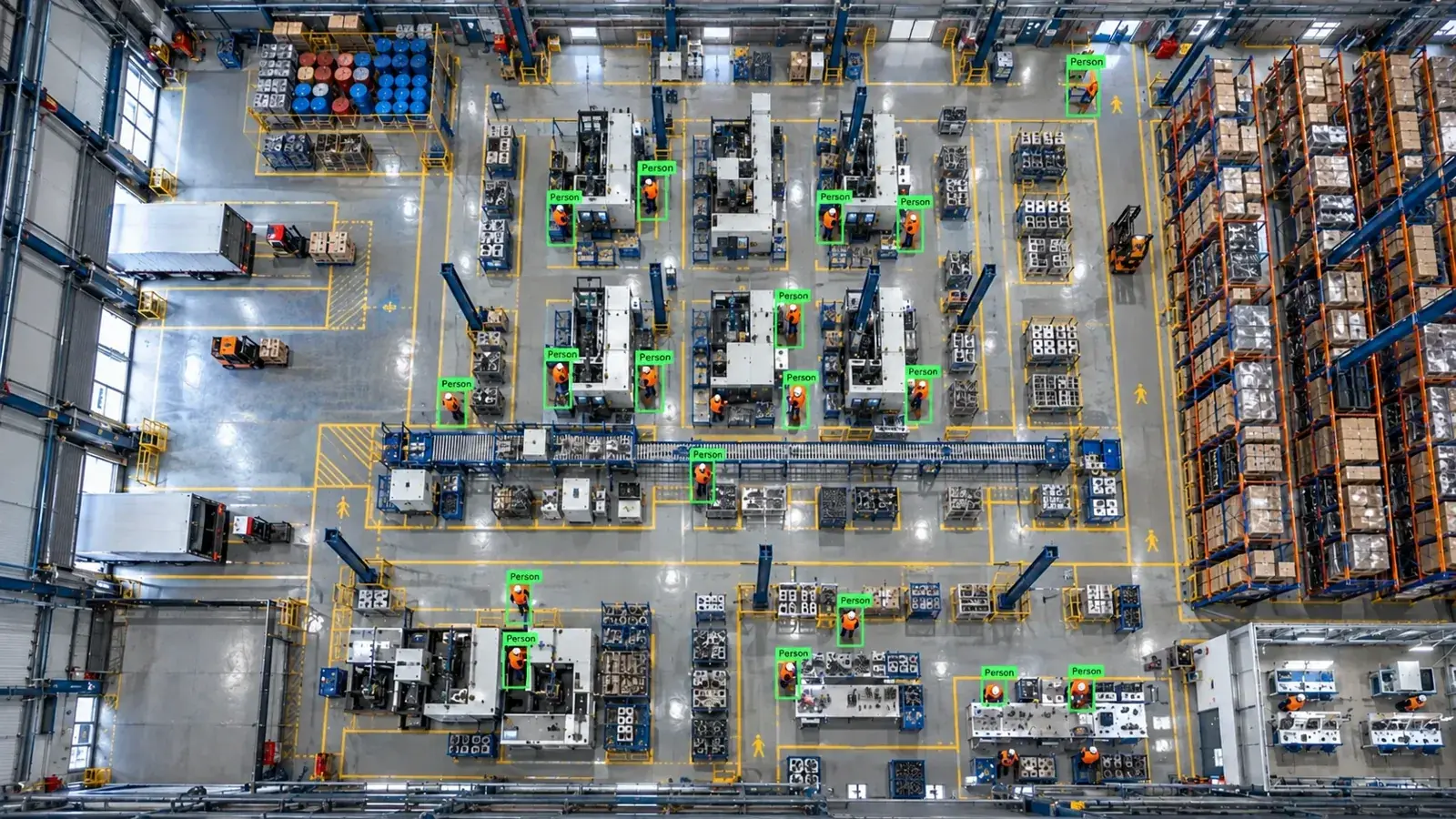
Yes, you can add AI-powered analytics to existing Hikvision IP cameras and NVRs via RTSP/ONVIF without replacing hardware. Proper connection, bandwidth, and user permission management are essential.
Is It Possible to Add AI Without Replacing Your Existing Hikvision Camera?
Existing Hikvision IP cameras and NVRs widely support RTSP (Real Time Streaming Protocol) and ONVIF standards. This allows streaming camera feeds to external AI analytic devices without hardware changes.
In other words, you can keep your cameras and NVRs in place and use edge servers or cloud-based solutions for AI video analysis. This approach reduces costs while ensuring operational continuity.
- Brand-independent connection via RTSP/ONVIF standards
- Adding an AI analytics layer while preserving existing infrastructure
- No physical camera or device replacements needed
Connection Methods: RTSP, ONVIF, NVR Channel and Sub-Stream Selection
When streaming data from Hikvision IP cameras or NVRs for AI analysis, establishing the correct connection is critical. RTSP is the most commonly used protocol, while ONVIF supports device discovery and control.
Choosing between main and sub-streams impacts analysis performance and bandwidth. The main stream provides high-resolution video but requires more bandwidth, whereas the sub-stream offers lower resolution and bandwidth, better suited for real-time analytics.
In NVR-based connections, channel streams can be directly used for video analysis. However, NVR resource usage limitations and potential latency should be considered.
- Obtaining live video streams via RTSP
- Device discovery and control through ONVIF
- Optimizing bandwidth using sub-stream selection
- Routing NVR channel streams to external analytics
AI Architecture: Camera, NVR/VMS, Edge Server, and Alarm Integration
An AI-enabled analytics system typically includes these components: IP camera, optionally NVR or VMS, an edge server performing AI analysis, and alarm or control panel systems.
The video stream is captured via RTSP from the camera or NVR and sent to the edge server. AI models on the edge server, such as those in the Hype-Model family, perform object detection, classification, and pose tracking.
Analysis results may trigger alarms, WhatsApp/SMS notifications, VMS pop-ups, or be sent via API to PLC/relay or ERP/MES systems.
This setup enables real-time alerts and integration with quality control workflows.
- Video streaming from camera/NVR over RTSP
- AI processing on edge servers
- Alarm and notification integrations (WhatsApp, SMS, VMS pop-ups)
- Data transfer to ERP, MES systems via REST APIs
Analyses and Applications Possible with Hikvision Cameras
Using the Hype-Model AI family, various industry-specific analyses are possible, including personal protective equipment (PPE) detection such as hard hats, restricted area intrusion detection, forklift and vehicle movement tracking, and counting people or vehicles.
For industrial quality control, specialized industrial cameras and lighting setups are critical alongside high camera resolution. Functions like mark-based inspection and product defect detection become important here.
However, the effectiveness of each analysis depends on factors like camera quality, angle, lighting, and available bandwidth, influencing accuracy and performance.
- PPE hard hat detection and clothing verification
- Restricted zone entry detection
- Analysis of forklift and vehicle movements
- Counting people, products, or vehicles
- Industrial quality control and defect detection
Technical Considerations: Permissions, Bandwidth, Codecs, and Firmware
User permissions and camera access rights must be properly configured. Authorized usernames and passwords are required for RTSP streams, and these must be securely managed in line with privacy regulations and security policies.
Bandwidth planning impacts AI system performance. RTSP streams may use H.264 or H.265 codecs. H.265 is more bandwidth-efficient but requires compatible decoders.
Firmware updates are crucial for security and protocol support. Updated versions that maintain ONVIF and RTSP compatibility are recommended.
- Ensure authorized access to RTSP streams
- Plan bandwidth allocation suitable for analytics
- Verify H.264/H.265 codec compatibility
- Stay current with firmware updates
- Comply with privacy laws and security policies
Suitability Evaluation and Installation Steps
Evaluate the system's suitability for AI analytics based on existing camera RTSP/ONVIF support and bandwidth capacity.
Next, perform a pilot installation of the AI platform, such as Hype Vision. Typically, the pilot phase lasts 2 to 4 weeks, during which camera angles, stream quality, and software parameters are optimized according to analysis scenarios.
The installation steps are as follows:
- 1. Identify RTSP/ONVIF stream URLs of cameras
- 2. Install and connect the edge server or analysis platform
- 3. Register streams on the platform and select sub-streams if needed
- 4. Choose AI analysis models and configure parameters
- 5. Configure alarm and notification integrations
- 6. Conduct performance and accuracy tests during the pilot phase
- 7. Plan system scaling and sustainability for final deployment
This page answers: hikvision artificial intelligence · hikvision rtsp ai · hikvision camera hard hat detection · hikvision nvr ai · hikvision ai camera
Frequently asked questions
How can I find the RTSP stream URL for my Hikvision camera?
Hikvision RTSP URLs usually follow this format: rtsp://[Username]:[Password]@[IP Address]:554/Streaming/Channels/[ChannelNo]. You can find the username, password, and channel number in the device's settings.
Why is the sub-stream preferred for AI analysis?
The sub-stream broadcasts at lower resolution and bitrate, reducing bandwidth needs and enabling faster real-time AI processing.
Can I send video from an existing NVR for AI analysis?
Yes, most NVRs support RTSP and can stream channel-specific feeds for external analysis. However, consider the device's processing load and potential latency.
How accurate is PPE hard hat detection with Hikvision cameras?
Accuracy depends on camera angle, resolution, lighting, and AI model quality. The Hype-Model family is optimized for this but requires testing and adjustments under operational conditions.
Is AI analysis better performed on-premise or in the cloud?
On-premise analysis offers data security and low latency, while cloud-based solutions provide scalability and easier maintenance. The choice depends on your requirements and existing infrastructure.
What can AI detect in your factory?
Let's review together which safety, quality and production analytics your existing security cameras can deliver.
- Free 15-minute technical call
- Camera infrastructure pre-assessment
- Feasible AI scenarios