
How to Integrate AI with ONVIF-Compatible CamerasLearn how to implement brand-independent AI analytics using your existing ONVIF-compatible cameras with seamless connection and architecture guidance.
Integrating AI applications into your existing IP/CCTV cameras that support the ONVIF protocol enables advanced image analysis without replacing hardware. This allows automation of tasks such as object detection, counting, and quality control.
This guide explains the core technical aspects, connection methods, architectural design, and implementation steps for AI integration with ONVIF cameras in a clear and detailed manner.
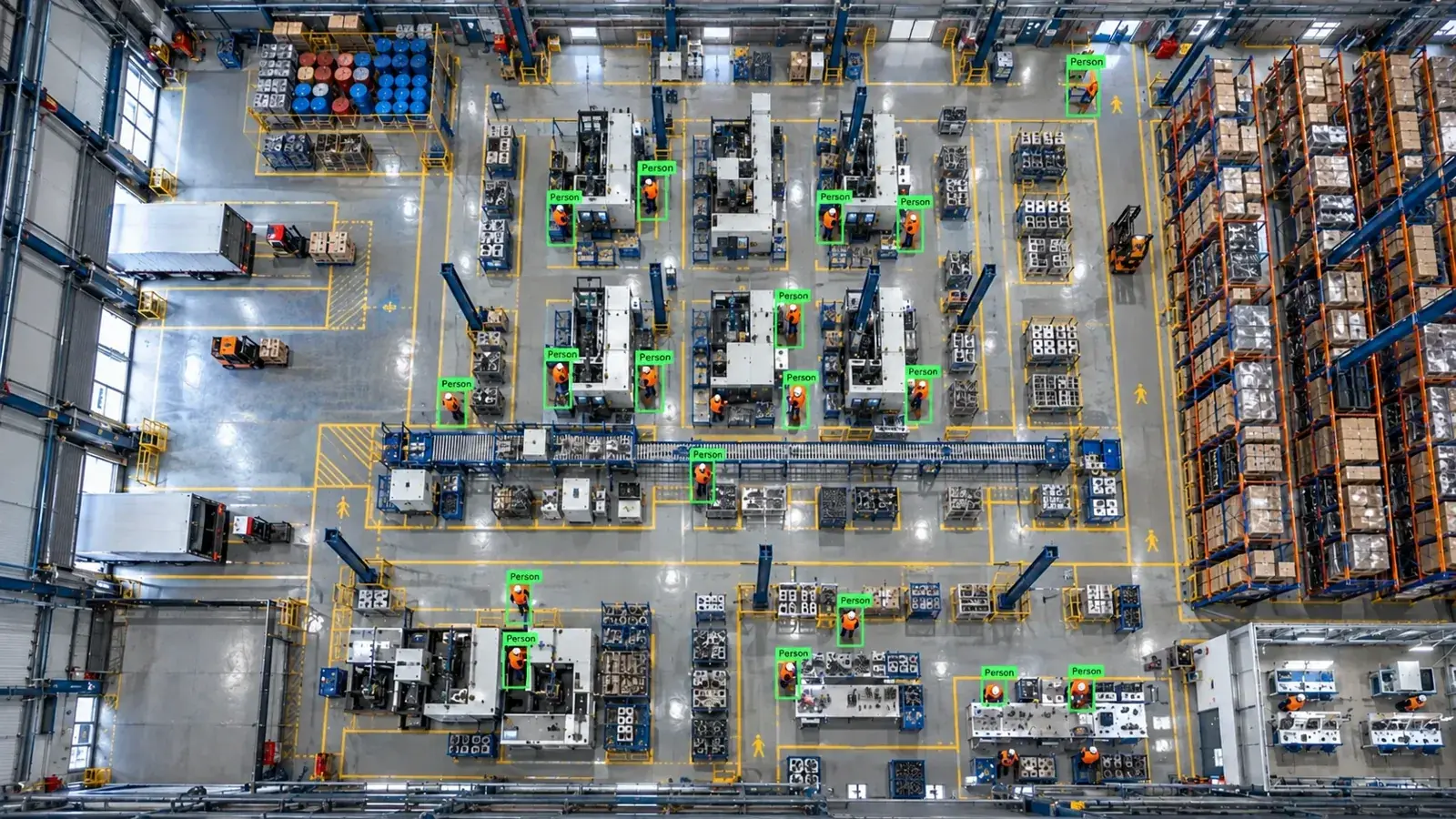
Existing ONVIF-compatible cameras can connect to AI analysis platforms via RTSP or ONVIF. The right connection method, architecture, and video encoding are crucial, enabling AI applications without extra camera investment.
Is AI Integration Possible Without Replacing Your Existing Camera?
The ONVIF protocol enables standardized communication among cameras from all brands. This means you can connect your existing IP or CCTV cameras to AI platforms without purchasing new devices.
Video data can be obtained independently of the camera manufacturer using the RTSP stream or ONVIF’s video streaming capabilities. However, the analysis success depends directly on quality, resolution, and infrastructure conditions.
To improve results, especially under low light or with moving objects, optimizing ambient lighting with industrial cameras and lighting combos is recommended.
Connection Methods: RTSP, ONVIF, and NVR Channel Streaming
RTSP protocol is commonly used to obtain video streams for AI analytics. ONVIF facilitates device discovery, channel characteristics, and selecting sub-streams.
If you have NVR or VMS systems, you can access channel streams through these devices or directly select sub-streams from cameras to balance bandwidth and processing load.
Sub-streams generally have lower resolution but are sufficient for analysis, reducing network traffic and CPU load.
- RTSP streams commonly follow rtsp://ip-address:port/path format.
- Stream URLs can be dynamically retrieved using the ONVIF device management protocol.
- Connecting to an NVR/VMS requires channel numbers and authorization credentials.
- Selecting sub-streams is beneficial when bandwidth is constrained.
- Codec compatibility (H.264, H.265) is important for analysis quality and performance.
Complete Integration Architecture and Data Flow
Typically, camera footage first reaches the NVR or VMS, then transfers to the edge server or directly to the AI platform. Analysis runs on the edge server using Hype-Model AI algorithms.
Analysis results can be sent to alarm panels, VMS pop-ups, WhatsApp/SMS notifications, or ERP/MES systems via REST APIs or PLC/relay outputs.
On-premise operation keeps data within the organization, ensuring data privacy compliance. Anonymous analysis modules maintain privacy during usage.
- Camera → NVR/VMS (optional) → Edge Server (Hype-Model AI) → Panel/Alarm/Feedback Systems
- Two-way control and security are prioritized within the data flow.
- On-premise setup suits data privacy and real-time responsiveness.
What Analyses Are Possible With AI?
The Hype-Model family includes modules for object detection, classification, pose and hand tracking, and OCR. This enables various sector-specific analyses such as:
Personal protective equipment (PPE) monitoring, restricted area violation alerts, forklift movement analysis, automatic product counting, and quality control are critical processes monitored with AI.
For each application, proper camera placement, image quality, and lighting conditions should be optimized.
- PPE monitoring (helmet, vest, mask compliance)
- Restricted area and entry-exit tracking
- Forklift and vehicle movement analysis
- Product counting and defective item detection
- License plate and label reading via OCR
Technical and Operational Considerations
User permissions and access control are key for security; only authorized personnel should access video and analysis results.
Regularly updating camera firmware is necessary to maintain connection compatibility and performance.
Modern video codecs like H.264 or H.265 should be used to manage bandwidth effectively.
AI processors and edge server performance are also critical for continuous operation.
- Clearly define user access levels and system roles
- Regularly verify camera firmware and protocol compatibility
- Use sub-streaming and video compression to reduce traffic
- Choose AI models suited to edge device hardware capabilities
Suitability Assessment and Installation Steps
First, verify that your cameras support ONVIF Profile S and RTSP access.
Assess video quality, network infrastructure, and business needs. Conduct pilot tests over 2–4 weeks to validate core analytics live.
Set up the AI platform infrastructure (edge server and connections), then select and configure analysis modules.
Complete final steps with alarm integrations (panel, SMS, VMS pop-ups) and user training.
- Test ONVIF & RTSP compatibility of cameras and network
- Identify AI modules that fit your requirements
- Perform pilot installation and evaluate performance
- Configure system integrations (alarms, APIs) post-installation
- Provide user training and develop ongoing support plans
This page answers: onvif ai · onvif camera ai · onvif profile s ai
Frequently asked questions
Can existing ONVIF-compatible cameras be reconfigured for AI?
Yes, current ONVIF or RTSP-supported cameras can typically connect to brand-independent AI analysis systems. This allows analysis to be done without replacing cameras.
What is the difference between RTSP and ONVIF, and which should be preferred?
RTSP is a protocol used to receive video streams, while ONVIF is a standard for device discovery, control, and stream management. Stream URLs are obtained via ONVIF, and RTSP carries the video stream; they are usually used together.
How is bandwidth optimized for AI analytics?
Bandwidth can be optimized by selecting sub-streams (substreams) and using video compression with H.264 or H.265 codecs. Avoid streaming at unnecessarily high resolutions.
Do camera firmware updates impact AI performance?
Yes, firmware updates affect protocol compatibility and video stream quality, which are important for ensuring the AI analysis system operates reliably and up to date.
Is camera angle and lighting important for AI analysis?
Absolutely. Successful analysis requires optimal camera angles, clear images, and sufficient lighting. Industrial lighting systems can be used where needed.
What can AI detect in your factory?
Let's review together which safety, quality and production analytics your existing security cameras can deliver.
- Free 15-minute technical call
- Camera infrastructure pre-assessment
- Feasible AI scenarios