
Add AI Analytics to Avigilon Cameras Without Replacing HardwareLearn how to integrate Hype Vision AI analytics with Avigilon cameras via RTSP/ONVIF streams to enable PPE detection, people counting, fire alerts, and more.
Integrating advanced AI video analytics with Avigilon (Motorola) cameras and ACC systems is achievable without replacing your current cameras or VMS. By leveraging open streaming protocols and on-premise edge servers, you can enhance situational awareness and operational safety.
Hype Vision's Hype-Model AI analytics runs alongside existing infrastructure, using RTSP/ONVIF streams to add analytics for PPE detection, restricted area monitoring, and quality control without interrupting your surveillance workflow.
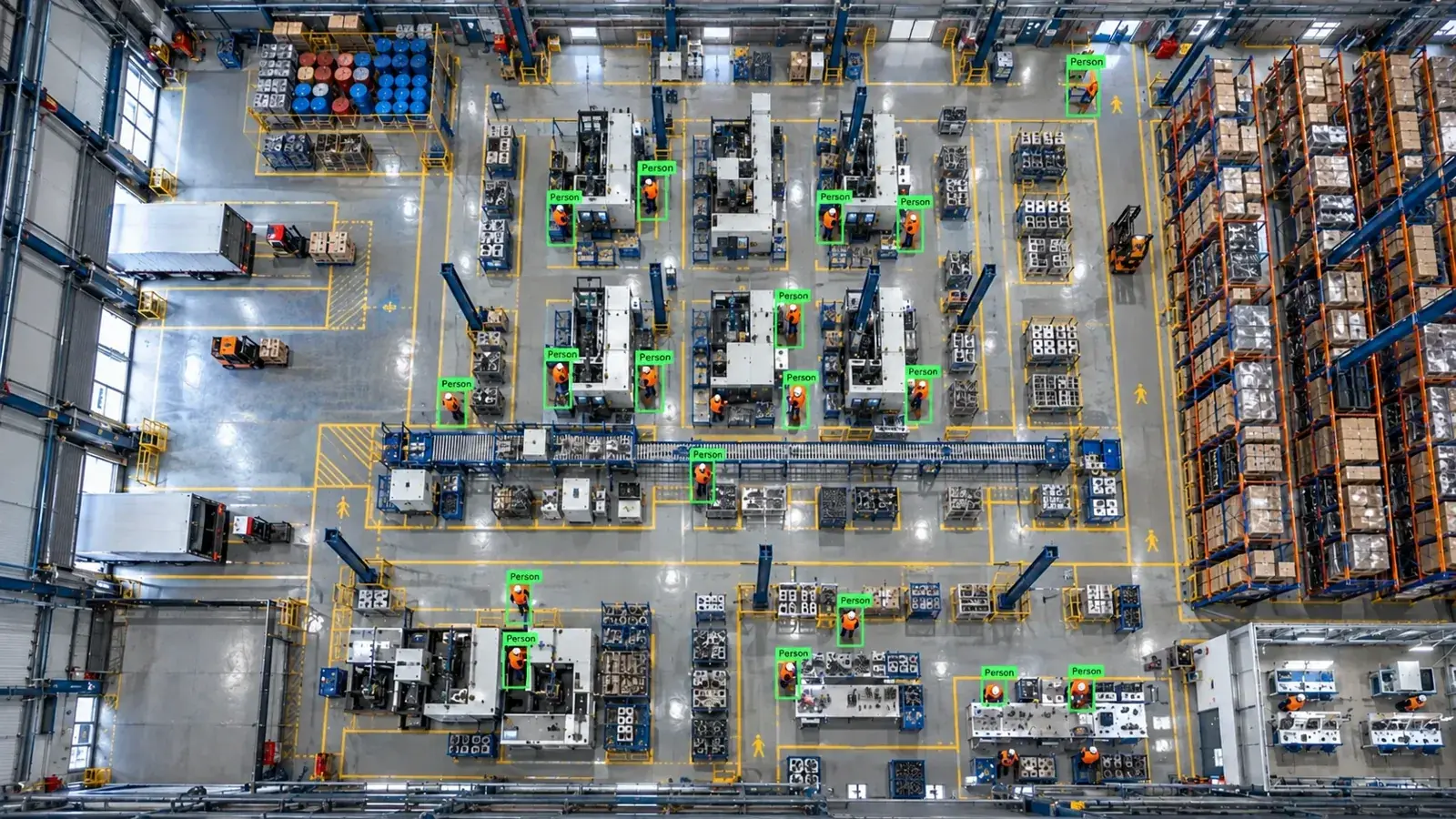
Hype Vision integrates AI analytics with Avigilon cameras via RTSP or ONVIF streams without replacing existing hardware or VMS. On-premise edge servers run Hype-Model analytics feeding realtime alerts for safety and operations.
How to Add AI Analytics to Avigilon Cameras
Avigilon cameras, including those managed by Avigilon Control Center (ACC), typically support RTSP and ONVIF for live video streaming. Hype Vision connects externally by consuming these streams, allowing the Hype-Model AI analytics to run on an on-premise edge GPU server. This approach retains your current cameras and VMS intact and adds AI on top.
Since Avigilon’s cloud or closed platforms sometimes restrict RTSP or API access, it's important to verify stream availability in your environment, especially if cameras are linked exclusively through cloud services. Typically, on-prem ACC installations provide RTSP or ONVIF streams that Hype Vision can ingest.
Once streams are accessible, the Hype-Model AI analyzes video feeds real-time, sending alerts and metadata to a dedicated dashboard, ERP/MES systems, or even triggering physical relays via PLC. Alerts can also be routed through WhatsApp, SMS, or pop up in your existing VMS dashboard.
- Identify cameras and ACC servers providing RTSP or ONVIF streams
- Configure Hype Vision edge server with corresponding stream URLs
- Run Hype-Model analytics on-premise GPU or CPU hardware
- Set up alert channels: dashboard, messaging apps, VMS popups, PLC integration
- Start with a 2-4 week pilot to validate streams and AI accuracy before full deployment
Supported Connection Methods: RTSP, ONVIF, and API Considerations
Avigilon cameras generally support RTSP and ONVIF, enabling third-party systems like Hype Vision to consume live video streams. RTSP provides direct video feed URLs, while ONVIF offers discovery and sometimes stream access, depending on device firmware.
Some Avigilon closed or cloud-centric products may limit RTSP or ONVIF functionality, restricting integration options. Verifying your system’s compatibility upfront is crucial.
Avigilon API access is primarily designed for management and metadata but typically does not expose raw video streams suitable for AI analytics. Thus, RTSP/ONVIF streams remain the most reliable connection point for Hype Vision.
Hype Vision can handle multiple video codecs, including H.264 and H.265, and supports pulling sub-streams (lower resolution, lower bandwidth) from cameras to optimize network load.
- RTSP: preferred for direct video stream access
- ONVIF: useful for device discovery and sometimes streaming
- API: limited video access, mainly management metadata
- Check firmware and permission settings to enable streams
- Use sub-streams to reduce bandwidth impact when possible
AI Analytics Feasibility on Avigilon Cameras
Hype Vision’s Hype-Model detects and classifies multiple scenarios relevant to industrial and security operations, including personal protective equipment (PPE) such as hard hats and hi-vis vests, forklift-pedestrian interactions, restricted area breaches, people counting, fire and smoke detection, as well as quality control inspections.
Realistic analytic accuracy depends on camera placement, lighting, and video quality. Cameras must have clear, unobstructed views of monitored zones.
While footage streamed from Avigilon cameras typically supports these analytics, complex scenes or poor video conditions may impact detection performance. Edge computing reduces latency, allowing near real-time alerts.
These privacy-friendly modules analyze anonymously without storing personally identifiable information, aligning with organizational compliance needs.
- PPE detection: hard hats, hi-vis vests
- Forklift and pedestrian separation monitoring
- Restricted area entry alerts
- People counting and flow analysis
- Fire and smoke early detection
- Quality and defect identification
Architecture Overview: Streaming to On-Premise Edge AI Server
The architecture connects Avigilon cameras or VMS (such as ACC) streams via RTSP/ONVIF to a local GPU/edge server running Hype Vision’s Hype-Model. This server processes video in real time, generating analytic insights and alerts.
Alerts can be consumed through Hype Vision’s dashboard, integrated with ERP/MES via REST API, sent as WhatsApp/SMS messages, or trigger VMS popups or hardware PLC/relay outputs.
This design ensures analytics run privately on-site without cloud dependency, avoiding bandwidth issues tied to uploading video streams externally.
Existing Avigilon infrastructure continues operating independently; Hype Vision runs as a complementary layer.
| Component | Role |
|---|---|
| Avigilon Camera / ACC | Provides video streams via RTSP/ONVIF |
| Edge AI Server (Hype Vision) | Runs Hype-Model analytics and alerting |
| Dashboard / Alerts | User interface for real-time analytics and notifications |
| ERP/MES / PLC | Optional integrations for operational response |
- Avigilon cameras / ACC → RTSP/ONVIF video streams
- On-prem edge server with GPUs runs Hype-Model AI analytics
- Alerts and metadata sent to dashboards, messaging, VMS popups
- Optional integration with PLC/relays and ERP/MES systems via REST API
Bandwidth, Video Quality, and User Permissions Considerations
Using AI analytics alongside existing Avigilon systems requires attention to bandwidth. Pulling full-resolution streams for multiple cameras can saturate networks, so sub-streams (lower bitrates) are often preferred without significant accuracy loss.
Both H.264 and H.265 streams are supported, with H.265 offering better compression if your hardware decodes it efficiently.
User and system permissions on Avigilon devices may restrict RTSP or ONVIF stream access. Coordinating with your IT and security teams to ensure proper credentials and firewall rules is essential.
Firmware versions can impact protocol support and stability; keeping devices updated may improve integration reliability.
Finally, remember that AI alerts for PPE or safety compliance provide general guidance based on visual cues and do not replace formal regulatory compliance checks.
- Prefer sub-streams to balance bandwidth and image quality
- Confirm support for H.264/H.265 decoding on AI server
- Ensure RTSP/ONVIF streams are enabled and accessible
- Coordinate firewall and network permissions
- Keep Avigilon firmware updated for best compatibility
Starting a Hype Vision Pilot with Avigilon Systems
A typical pilot lasts 2-4 weeks and aims to validate streaming access, AI model tuning, and alert configuration without disrupting current surveillance operations.
Steps include confirming RTSP/ONVIF stream URLs from your Avigilon cameras or ACC, deploying the Hype Vision edge server at your site, and mapping camera views for specific analytics use cases.
During the pilot, you can evaluate detection accuracy for PPE, restricted zones, or fire alerts with real-time feedback.
The pilot helps identify any bandwidth issues, permissions challenges, or environmental factors affecting results prior to full-scale rollout.
Hype Vision provides technical support throughout to ensure smooth integration and fine-tuning.
- Verify RTSP/ONVIF stream availability on Avigilon cameras or ACC
- Install on-prem edge server near camera network
- Configure Hype-Model analytics per your safety and operational goals
- Test and validate alerts and dashboard monitoring
- Assess network load and user permissions during trial
- Review pilot findings to plan full deployment
This page answers: avigilon ai analytics · add ai to avigilon · avigilon ppe detection · avigilon third party analytics · avigilon onvif ai
Frequently asked questions
Can Hype Vision AI analytics work with Avigilon’s cloud-managed cameras?
Many cloud-managed Avigilon cameras have limited RTSP or ONVIF stream access which may restrict external AI integration. For best results, on-prem installations with accessible RTSP/ONVIF streams are recommended to enable Hype Vision analytics.
Does integrating Hype Vision require replacing my Avigilon cameras or ACC VMS?
No, Hype Vision works alongside your existing Avigilon cameras and ACC without hardware or VMS replacement by consuming video streams externally.
What kinds of AI analytics are feasible on Avigilon camera feeds?
Hype Vision’s Hype-Model supports PPE detection (hard hats, hi-vis vests), forklift-pedestrian monitoring, restricted area alerts, people counting, fire/smoke detection, and quality inspections.
How does Hype Vision access video streams from Avigilon devices?
Hype Vision primarily uses RTSP and ONVIF streams exposed by the cameras or ACC server. API-based stream access is limited on Avigilon devices, so direct streaming protocols are preferred.
Are there bandwidth concerns when running AI analytics on Avigilon camera streams?
Yes, full-resolution streams can require significant bandwidth. Using sub-streams (lower resolution streams provided by cameras) helps reduce network load while maintaining analytics accuracy.
Is the AI analytics solution compliant with privacy regulations?
Hype Vision’s modules are designed to be privacy-friendly by analyzing video anonymously without storing personal identifiable information. This general information is not legal advice; please consult your compliance experts.
What can AI detect in your factory?
Let's review together which safety, quality and production analytics your existing security cameras can deliver.
- Free 15-minute technical call
- Camera infrastructure pre-assessment
- Feasible AI scenarios