
Axis Camera AI Integration with Hype VisionLearn how to integrate AI with existing Axis IP cameras via RTSP/ONVIF, including technical details and best practices.
Axis IP cameras can be integrated with various AI platforms thanks to their open protocols. Hype Vision offers advanced AI analytics through brand-independent RTSP/ONVIF connections.
This guide covers connection methods, architecture, analysis capabilities, and important technical considerations for integrating AI with Axis cameras.
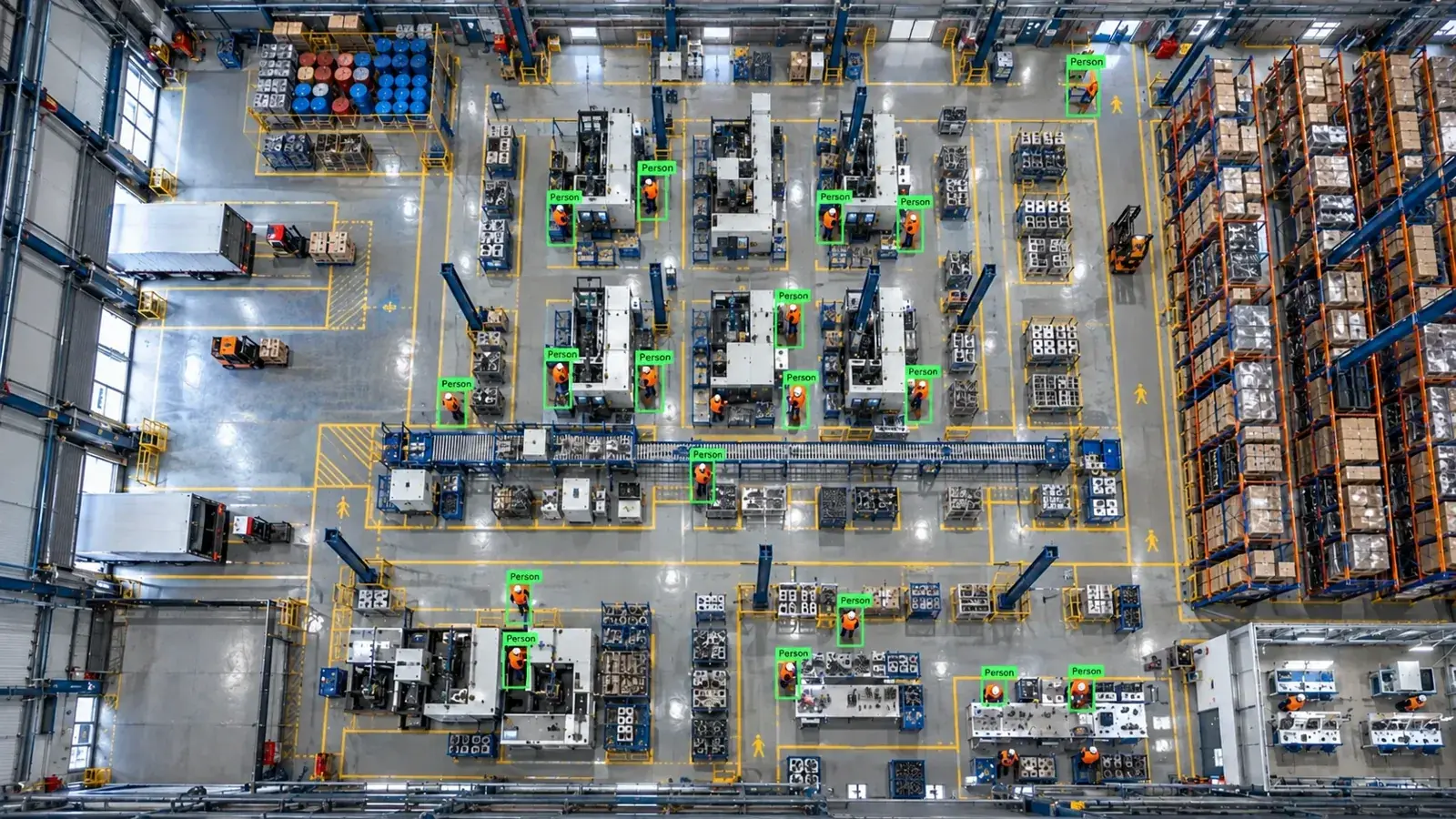
Yes, existing Axis IP cameras supporting RTSP/ONVIF can integrate with any AI platform. Connection methods, bandwidth, codec, and authentication details are crucial for success.
Is AI Integration Possible with Existing Axis Cameras?
Axis cameras support standard protocols like RTSP and ONVIF, enabling connection to AI platforms without replacing your current camera infrastructure.
However, built-in camera analytics typically have limited capabilities and lack flexibility. External AI solutions offer more advanced and customizable analysis.
- AI analysis can be applied without replacing existing IP cameras.
- Any RTSP/ONVIF-compatible platform-independent analysis software can be utilized.
- Certain ACAP plug-ins may offer additional analytics but lock you into specific platforms.
Connection Methods for AI Analysis from Axis Cameras
Axis cameras usually stream video to external systems via RTSP or ONVIF. Through RTSP, you can select the main or sub-stream from the camera.
RTSP connections are made by specifying the camera’s IP address and stream path directly, while ONVIF facilitates device discovery, triggers, and stream management.
In some cases, video feeds are routed first through NVR or VMS systems, which then forward selected channels to AI platforms—this architecture is especially useful for managing multiple cameras.
- Main or sub-streams can be pulled directly via RTSP.
- ONVIF supports device discovery and stream control.
- Centralized management is possible via streams from NVR/VMS systems.
- Sub-streams with lower bandwidth usage are preferred but must maintain adequate resolution for AI.
Advantages of Camera → NVR/VMS → Edge Server → Alarm Architecture
Video is commonly captured by the camera and aggregated on central NVR or VMS systems. AI analytics run on these systems or on local 'edge servers' connected to them.
Results are relayed through alarm panels, WhatsApp/SMS, VMS pop-ups, PLC/relay outputs, ERP/MES, or REST APIs, enabling real-time automated workflows.
- Camera footage is centrally collected on NVR or VMS.
- High-performance AI models (Hype-Model) run on edge servers.
- Analysis outputs integrate via diverse protocols and interfaces.
- On-premise deployment ensures data security and compliance with personal data regulations (KVKK).
Examples of AI Analyses Possible with Axis Cameras
With the Hype Vision platform, Axis camera footage can be analyzed for object detection, classification, pose/hand tracking, OCR, and more. Industrial conditions are accommodated with camera and lighting support.
Common applications include detecting personal protective equipment (PPE), monitoring restricted area breaches, counting forklifts and vehicles, and performing quality control.
- PPE detection such as helmets, gloves, and masks
- Unauthorized access alarms for defined restricted areas
- Counting and tracking forklifts and other vehicles
- Product quality inspection, defect detection, and barcode/label reading via OCR
Technical and Operational Considerations
Bandwidth, video codec format (H.264, H.265), camera firmware updates, and user permissions are critical for AI integration. Insufficient bandwidth can disrupt even sub-stream transmission.
Proper authorization must be configured on the camera, RTSP/ONVIF credentials should be secured, and anonymized data processing should be prioritized to comply with KVKK regulations.
RTSP URL structures vary by camera model and firmware version, so accurate documentation must be reviewed.
- Optimize bandwidth and resolution settings
- Ensure secure user access and authorization
- Verify firmware and version compatibility
- Maintain data privacy and KVKK compliance
- Thoroughly review camera RTSP/ONVIF documentation
Integration and Compatibility Assessment Steps
1. Evaluate existing camera infrastructure and network to confirm RTSP/ONVIF support.
2. Identify suitable video stream URLs and test both main and sub-streams.
3. Assess network capacity and security policies against Hype Vision requirements.
4. Initiate a 2-4 week pilot project to test image quality, analysis accuracy, and alarm integrations.
5. Add industrial-grade cameras and lighting if needed for enhanced quality control.
6. Plan full-scale deployment based on pilot results.
This page answers: axis ai integration · axis rtsp ai · axis camera ppe detection · axis ip camera image processing
Frequently asked questions
How do Axis cameras connect to AI platforms via RTSP?
The RTSP URL is configured with the camera’s IP, username, and password. Either the main or sub-stream is selected to deliver live video to AI platforms like Hype Vision.
Why is ONVIF support important for AI integration?
ONVIF enables device discovery and control, facilitating RTSP stream management, trigger handling, and configuration changes, which simplifies system integration.
Which stream quality is preferred for AI analysis?
Streams with sufficient resolution (typically 720p or higher) are recommended for accurate analysis, balancing image quality and bandwidth requirements.
Do existing VMS or NVR systems affect AI integration?
Integrating via VMS/NVR systems offers centralized control and multi-channel handling, but direct RTSP from cameras is also supported. Hype Vision supports both approaches.
How is KVKK-compliant video analysis achieved?
Hype Vision uses anonymized analysis modules to avoid processing personal data. On-premise setups ensure data does not leave the local environment, supporting KVKK compliance.
What can AI detect in your factory?
Let's review together which safety, quality and production analytics your existing security cameras can deliver.
- Free 15-minute technical call
- Camera infrastructure pre-assessment
- Feasible AI scenarios