
Add AI Video Analytics to Bosch IP Cameras Without ReplacementLearn how to add AI analytics to Bosch IP cameras via RTSP/ONVIF, integrating edge AI for PPE detection, people counting, and more—without changing your existing setup.
Adding AI video analytics to your Bosch IP security cameras can enhance safety and operational efficiency without replacing existing hardware or your video management system (VMS).
Using industry-standard streaming protocols like RTSP and ONVIF, Hype Vision's AI runs on-premises, integrating seamlessly alongside your Bosch cameras and VMS.
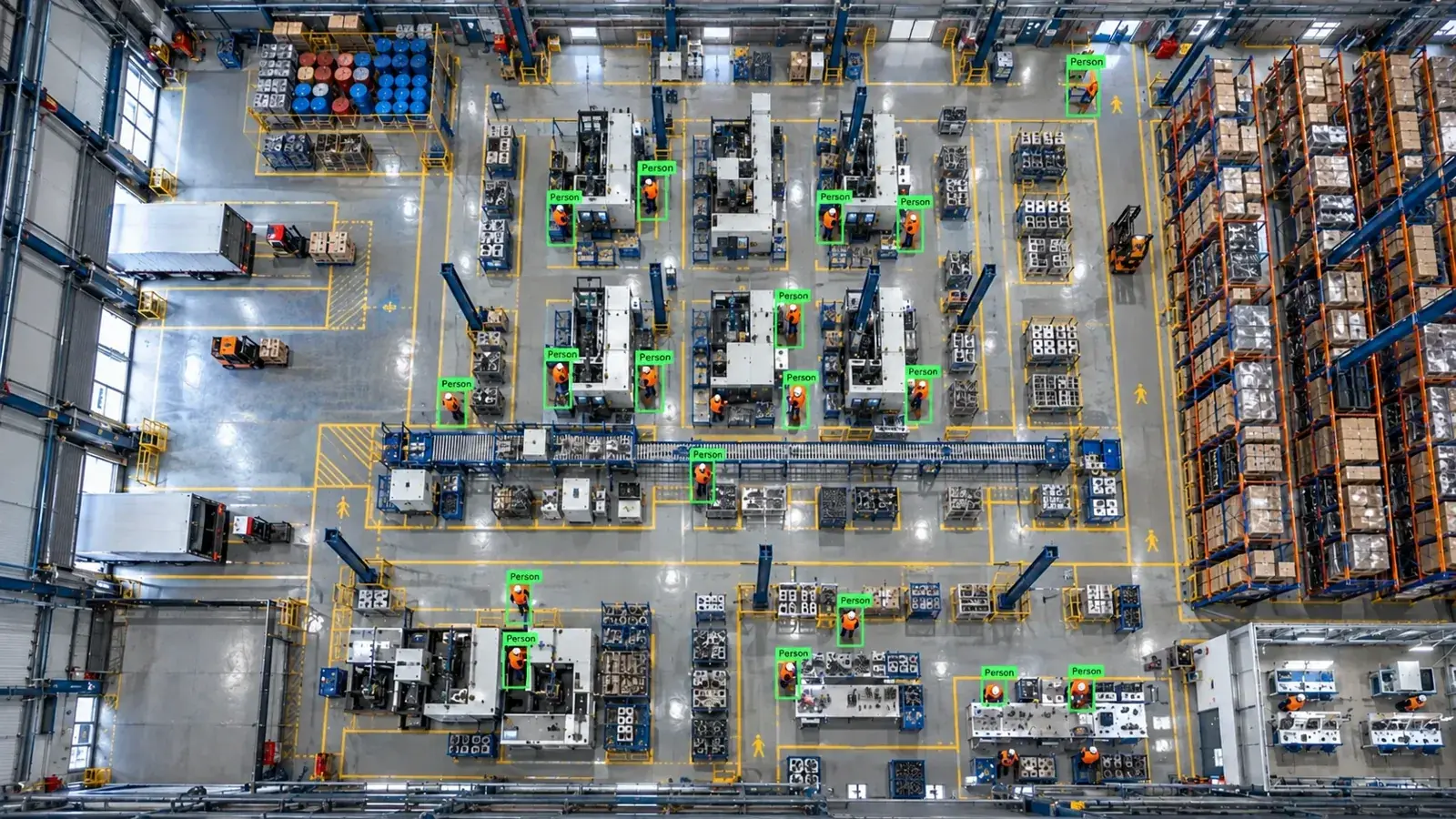
You can add AI analytics to Bosch IP cameras by connecting their RTSP or ONVIF streams to an on-site Hype Vision AI server. This works alongside your existing cameras and VMS without replacement, enabling real-time PPE detection, people counting, and more.
How to Add AI Analytics to Bosch IP Cameras
Bosch IP cameras typically support standard protocols like RTSP and ONVIF, allowing third-party systems to access video streams for AI analytics. However, some Bosch cloud or closed-platform solutions may limit direct RTSP or API access.
Hype Vision’s edge AI platform connects to these accessible video streams without needing to replace cameras or your existing VMS. The AI runs on-premise—often on GPU-enabled servers at your facility—analyzing live video feeds and sending alerts via dashboard, messaging, or integration endpoints.
The connection workflow usually follows this sequence: Bosch camera/VMS → RTSP or ONVIF video stream → Hype Vision on-site AI server → Analytics dashboard and alert system.
- Identify accessible streaming (RTSP/ONVIF) endpoints from Bosch cameras or VMS.
- Configure Hype Vision AI server to ingest these streams on-premise.
- Run Hype-Model analytics tailored to your use case.
- Receive real-time alerts on dashboards, mobile, or system integrations.
Technical Connection Methods: RTSP, ONVIF, and APIs
RTSP (Real-Time Streaming Protocol) is widely supported by Bosch IP cameras and provides live video streams for AI analysis. It is the most direct way to access the video feed.
ONVIF (Open Network Video Interface Forum) compliance means Bosch cameras offer standardized ways to discover cameras, manage streams, and control PTZ functions, which can be leveraged to pull video streams for AI.
Some Bosch cloud or closed-platform services may restrict RTSP or API access, limiting third-party integration. In such cases, re-routing streams via the local VMS (that supports RTSP/ONVIF) is a practical solution.
Hype Vision integrates with whatever streams are accessible onsite, ensuring compatibility despite platform restrictions.
- Use RTSP URLs from Bosch cameras or VMS for primary video feed access.
- Leverage ONVIF discovery and streaming for multi-camera setups and control.
- Understand platform limitations if using Bosch cloud services; prefer local VMS stream access.
- Configure edge AI server with valid credentials and stream URLs to run Hype-Model analytics.
Feasible AI Analytics with Bosch Cameras and Hype-Model
These analytics run locally, protecting privacy by anonymizing individuals in most modules. Alerts can trigger via dashboards, SMS, WhatsApp, VMS pop-ups, or integration with PLC/ERP systems.
- PPE detection: hard hats, hi-vis vests, safety glasses
- Forklift and pedestrian collision risk areas
- Restricted zone intrusions
- People counting and occupancy monitoring
- Fire and smoke detection
- Quality assurance checks in manufacturing lines (e.g., missing components)
- Pose estimation for ergonomic assessments
Architectural Overview: From Bosch Cameras to AI Insights
The architecture integrates Bosch IP cameras and existing VMS with Hype Vision’s AI software running on a dedicated edge server. The typical data flow includes:
| Camera Layer | Bosch IP Cameras streaming RTSP/ONVIF |
|---|---|
| Management Layer | Existing Bosch or third-party VMS (optional) |
| AI Processing Layer | On-prem Hype Vision edge server running Hype-Model |
| Alert & Integration Layer | Dashboard, mobile alerts, VMS pop-ups, PLC/ERP integration |
- Bosch cameras capture video and send streams over RTSP/ONVIF.
- Existing VMS may manage and aggregate these feeds without altering the streams.
- Hype Vision’s on-premise edge server continuously ingests selected video streams.
- Real-time AI analytics run on GPU-enabled hardware to detect critical events.
- Alerts and reports feed back to operations via dashboards, messaging apps, or industrial integration.
Bandwidth, Streaming, and System Considerations
AI analytics requires video streams of sufficient quality and frame rate. Using a sub-stream from Bosch cameras at lower resolution and H.264 or H.265 encoding reduces bandwidth without compromising detection accuracy.
User permissions and credential management on Bosch cameras/VMS are critical to securely accessing RTSP/ONVIF streams.
Keeping camera firmware updated enhances compatibility and performance with third-party AI systems.
Ensure your on-premise AI server has adequate GPU and CPU resources to handle multiple video streams and analytics workloads simultaneously.
- Configure sub-streams at 720p or lower for AI analytics to save bandwidth.
- Use H.264 or H.265 compression depending on camera support.
- Verify and manage user permissions on Bosch devices for seamless stream access.
- Plan AI server hardware and network capacity based on the number of cameras analyzed.
Starting with a Pilot: 2-4 Week Integration Path
This iterative pilot phase ensures smooth integration without disrupting existing security or operational workflows.
- Assess existing Bosch camera network and identify accessible RTSP/ONVIF streams.
- Deploy Hype Vision edge server onsite with required hardware accelerators.
- Configure video streams and run Hype-Model AI modules tailored to your scenarios.
- Evaluate detection accuracy and response times with real operational data.
- Set up alerting channels and integration endpoints for real-time notifications.
- Adjust analytics thresholds and fine-tune model parameters for optimal outcomes.
This page answers: bosch camera ai analytics · add ai to bosch cameras · bosch ppe detection · bosch onvif ai
Frequently asked questions
Can Hype Vision AI analytics work with Bosch cameras without changing my VMS?
Yes, Hype Vision connects to Bosch camera streams via RTSP or ONVIF and runs AI analytics on a separate on-premise server. This setup works alongside your existing VMS without requiring replacement or modification.
Are all Bosch IP cameras compatible with RTSP or ONVIF for AI integration?
Most Bosch IP cameras support RTSP and ONVIF standards. However, certain cloud-managed or tightly controlled systems may limit direct stream access. In those cases, accessing streams through your local VMS is recommended.
What types of AI analytics are feasible on Bosch camera streams?
Common analytics include PPE detection, people counting, restricted area alerts, forklift safety, fire and smoke detection, and quality assurance. Hype Vision’s models are privacy-conscious and designed to run efficiently on real-time streams.
Does adding AI analytics increase network bandwidth significantly?
AI doesn’t generate additional network traffic—it consumes existing video streams. Using lower-resolution sub-streams (720p or below) and efficient codecs like H.264 reduces bandwidth usage during AI analytics.
Is Hype Vision officially partnered with Bosch for AI integration?
No, Hype Vision is not an official Bosch partner. Our AI solutions connect alongside existing Bosch systems using open protocols like RTSP and ONVIF, providing vendor-agnostic AI analytics support.
Is PPE detection using AI considered OSHA or ANSI compliance verification?
PPE detection using AI provides general safety monitoring to support workplace protocols but is not a substitute for official OSHA or ANSI compliance audits or legal advice.
What can AI detect in your factory?
Let's review together which safety, quality and production analytics your existing security cameras can deliver.
- Free 15-minute technical call
- Camera infrastructure pre-assessment
- Feasible AI scenarios