
Genetec AI Video Analytics Integration with Hype VisionLearn how to add AI video analytics to Genetec Security Center VMS using Hype Vision’s on-prem solution via RTSP or ONVIF without replacing cameras or VMS.
Integrating AI video analytics into your existing Genetec Security Center VMS can significantly enhance facility safety and operational insights without replacing your cameras or VMS. Hype Vision offers a brand-agnostic, on-prem AI solution that works alongside Genetec by leveraging existing RTSP or ONVIF camera streams. This approach enables advanced analytics such as PPE detection, people counting, and restricted zone monitoring, preserving privacy and minimizing disruption.
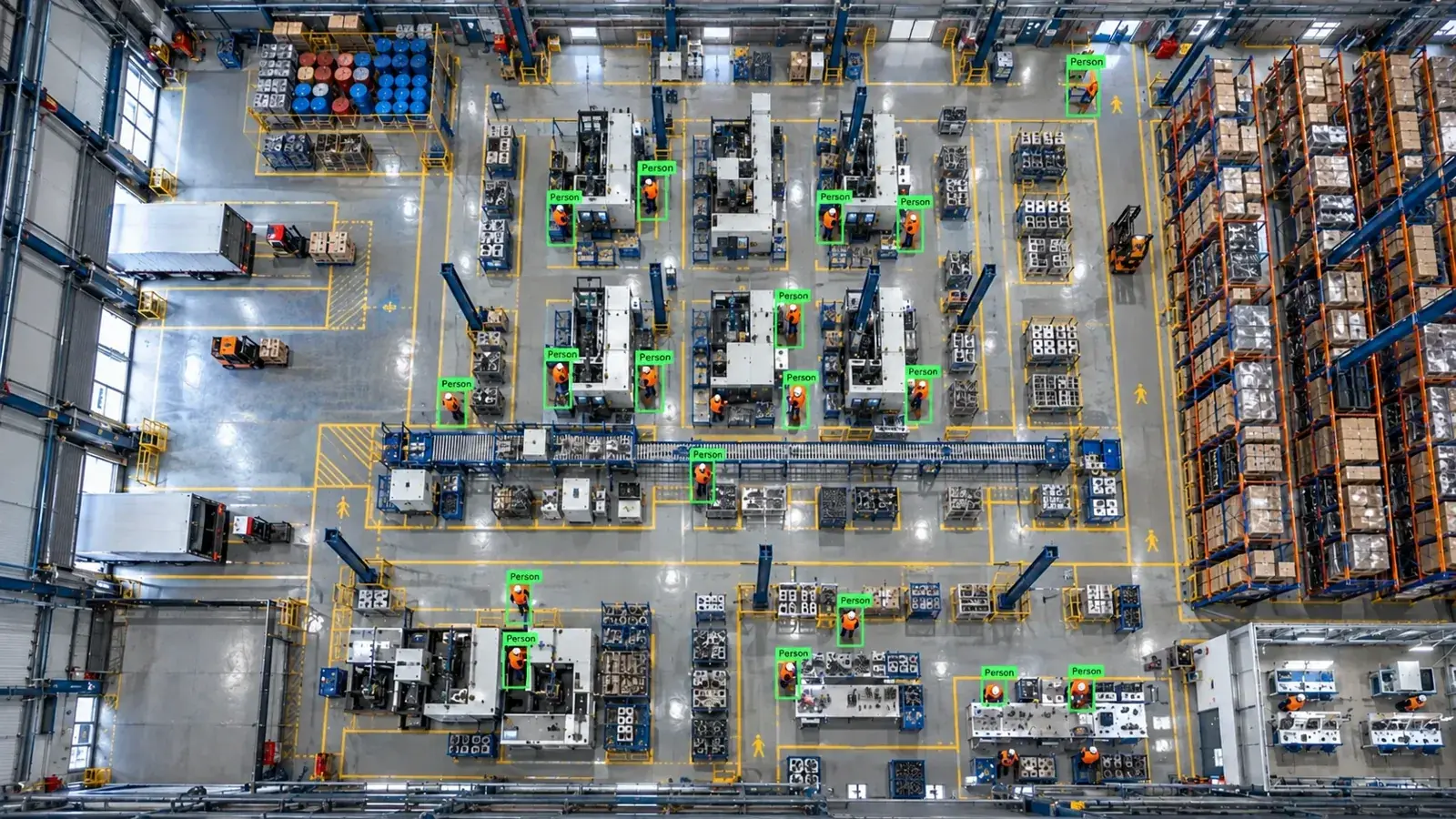
Hype Vision connects to Genetec Security Center by ingesting RTSP or ONVIF camera streams alongside your existing system, enabling AI analytics on-prem without replacing hardware or VMS.
How Hype Vision AI Integrates with Genetec Security Center
Hype Vision enhances Genetec Security Center by tapping into live video streams from your existing cameras without interfering with the VMS. The realistic integration uses standard protocols like RTSP or ONVIF to access camera feeds, or APIs where manufacturers provide them. This allows Hype Vision’s on-prem edge server, equipped with GPU processing, to run Hype-Model AI analytics in parallel with Genetec’s native system.
Some cloud or closed camera platforms limit access to RTSP streams or APIs, which can restrict third-party integration. Hype Vision works best with cameras and VMS setups that support open streaming protocols, such as RTSP and ONVIF, common in most IP CCTV systems.
- Connect via RTSP or ONVIF streams from existing IP/CCTV cameras
- Process video on a local GPU-equipped edge server running Hype-Model AI
- Send event alerts and data to dashboards, Genetec VMS pop-ups, or external systems via REST API
- Operate alongside Genetec without replacing cameras or existing VMS software
Typical Integration Architecture
The architecture places Hype Vision’s AI processing after the camera and before (or parallel with) the VMS display. Cameras stream video via RTSP/ONVIF to both Genetec Security Center and the edge AI server. The edge server analyzes video frames using Hype-Model algorithms and generates real-time alerts or data outputs.
Alerts can be integrated through Genetec’s native mechanisms, such as VMS pop-ups or linked via REST APIs to ERP and MES systems. Additionally, Hype Vision provides privacy-friendly, anonymous analytics and outputs to dashboards or communication tools like WhatsApp or SMS.
| Camera | RTSP/ONVIF Stream | AI Edge Server | Output/Dashboard |
|---|---|---|---|
| Existing IP/CCTV cameras | Dual RTSP/ONVIF feed | Hype-Model analytics on GPU server | Alerts, Genetec popups, REST API, dashboard |
- IP Cameras → RTSP/ONVIF stream → Genetec Security Center VMS
- IP Cameras → RTSP/ONVIF stream → On-prem Hype Vision AI server
- Hype Vision AI server → Dashboard, alerts, REST API, Genetec VMS notifications
Feasible AI Video Analytics with Hype Vision for Genetec
Hype Vision’s AI analytics suite covers a broad range of use cases typically sought in industrial and security environments. When integrated with Genetec Security Center, these analytics complement existing video workflows with intelligent event detection. Examples include detection of personal protective equipment (PPE) like hard hats and hi-vis vests; safety scenarios such as forklift-pedestrian interaction; restricted area breaches; counts of people moving through zones; and early alerts for fire or smoke.
Quality assurance and operational monitoring are also supported with inspection and defect recognition models, running anonymously to respect privacy requirements.
- PPE compliance (hard hats, hi-vis vests)
- Forklift and pedestrian safety monitoring
- Restricted area intrusion detection
- People counting and flow analysis
- Fire and smoke detection
- Quality control and defect identification
Technical Considerations for Integration
Successful integration of Hype Vision AI with Genetec requires attention to several technical factors including bandwidth, video codec compatibility, and user permissions. Since video streams can consume significant network capacity, leveraging a lower-resolution sub-stream for AI processing is common to optimize performance without compromising accuracy.
H.264 is widely used and well supported by Hype Vision’s engine; H.265 is also supported but may require more processing power. User access settings and permissions on Genetec and cameras must allow read access to RTSP or ONVIF streams by the AI server.
Firmware versions can impact protocol support and stream stability, so maintaining updated and compatible firmware on cameras and VMS is advisable. Note that some cloud-managed or proprietary camera solutions limit RTSP or API access, potentially constraining integration.
- Use sub-streams for AI to reduce bandwidth load
- Ensure cameras support RTSP or ONVIF streaming
- Prefer H.264 streams; H.265 workable with sufficient resources
- Configure user permissions for stream access
- Maintain firmware to support open protocols
Starting a Hype Vision Pilot with Genetec Security Center
The typical pilot phase lasts 2 to 4 weeks, providing valuable proof of concept before full deployment. During the pilot, Hype Vision analysts collaborate to identify camera placements and streaming configurations that best suit your facility’s AI objectives. Using your existing IP cameras and Genetec system, the pilot tests real-time AI analytics running on-site without interfering with normal VMS operations.
You receive access to a secure, easy-to-use dashboard for monitoring alerts and insights, demonstrating how analytics improve situational awareness and operational efficiency. The pilot phase also helps assess network load, alert configurations, and API integration options tailored to your workflows.
- Select pilot cameras and confirm RTSP/ONVIF stream access
- Deploy on-prem edge AI server with GPU
- Configure Hype-Model analytics modules for targeted scenarios
- Test outputs: dashboards, VMS popups, REST API integrations
- Evaluate performance, alert relevancy, and network impact
Important Notes on Compliance and Data Privacy
Hype Vision's AI analytics modules are designed with privacy in mind, anonymizing individuals and focusing on object-level data rather than personal identities. This approach supports compliance with general data protection and workplace safety standards. For PPE and safety compliance, note that legal and regulatory requirements vary locally; Hype Vision provides tools to support safety programs but does not offer legal advice.
This page answers: genetec ai analytics · genetec video analytics integration · add ai to genetec · genetec ppe detection · genetec third party analytics
Frequently asked questions
Can Hype Vision AI work with all cameras compatible with Genetec Security Center?
Hype Vision connects via RTSP or ONVIF streams supported by most IP/CCTV cameras. However, some cloud or closed platforms restrict access to RTSP or APIs. It is important to verify that your cameras allow an open stream accessible by a third-party AI server.
Does adding Hype Vision AI require replacing my existing Genetec VMS or cameras?
No. Hype Vision runs alongside your current cameras and VMS without replacement. It taps into existing streams to perform AI analytics on-premise, preserving your current infrastructure.
What types of video analytics can be integrated with Genetec using Hype Vision?
Common analytics include PPE detection (hard hats, vests), safety scenarios (forklift-pedestrian), restricted zone alerts, people counting, fire/smoke detection, and quality inspection.
How does Hype Vision ensure privacy when analyzing video feeds?
Most Hype Vision modules operate anonymously by analyzing objects without identifying individuals, supporting privacy-friendly AI suited to regulated environments.
What technical requirements should I verify before starting integration?
Confirm your cameras support RTSP or ONVIF with readable streams, check your network bandwidth, ensure user permissions allow stream access, and maintain updated firmware for compatibility.
Is Hype Vision officially partnered with Genetec?
Hype Vision is not an official Genetec partner. The AI solution connects alongside Genetec Security Center by ingesting existing streams but operates independently.
What can AI detect in your factory?
Let's review together which safety, quality and production analytics your existing security cameras can deliver.
- Free 15-minute technical call
- Camera infrastructure pre-assessment
- Feasible AI scenarios