
Add AI Analytics to Hanwha Vision (Wisenet) Cameras On-PremiseLearn how to add external AI analytics to Hanwha Vision Wisenet cameras using RTSP/ONVIF streams, without replacing existing systems or VMS.
Hanwha Vision (Wisenet) cameras are widely used in industrial and commercial settings for security and monitoring. Integrating advanced AI analytics with these cameras without replacing them or the existing video management system (VMS) can enhance operational safety and efficiency.
This guide explains how to connect Hype Vision’s AI-enabled Hype-Model analytics to Hanwha Vision cameras using standard streaming protocols like RTSP and ONVIF, enabling real-time AI insights on-premise without affecting current infrastructure.
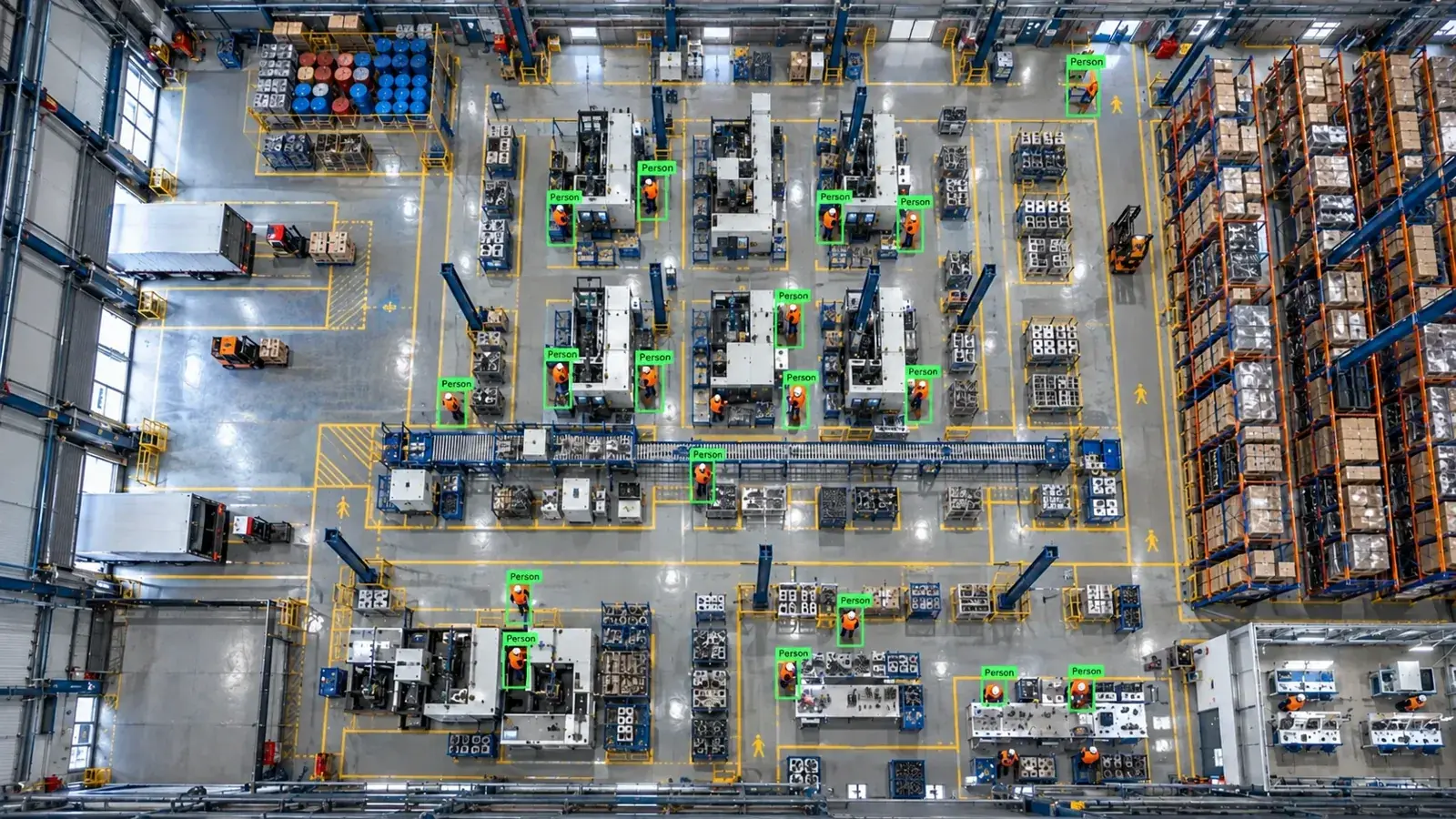
Hype Vision connects externally to Hanwha Vision Wisenet cameras via RTSP or ONVIF streams. AI analytics run locally on an edge server, augmenting existing systems for alerting and monitoring without replacing cameras or VMS.
How Hype Vision Adds AI to Hanwha Vision Cameras
Hanwha Vision (Wisenet) cameras provide high-quality IP video streams that can be accessed using standard protocols such as RTSP and ONVIF. Hype Vision utilizes these open streams to add AI analytics without altering existing hardware or the video management software. This approach supports a seamless AI upgrade that works alongside your current system.
Because some Hanwha cloud or closed-platform cameras restrict full RTSP or ONVIF access, it is important to verify stream availability and permissions before integration. Most on-premise Dahua, Axis, and Hanwha cameras expose multiple RTSP streams and ONVIF interfaces suitable for external AI consumption.
- Connect to camera or VMS RTSP sub-streams (H.264/H.265) for efficient bandwidth use
- Use ONVIF protocol for device discovery and stream management where supported
- Run AI inference on an on-prem edge server with GPU acceleration using Hype-Model analytics
- Send alerts and data to dashboard, VMS popups, SMS/WhatsApp, ERP/MES systems, or PLC/relay outputs
Technical Architecture for Hanwha Vision AI Integration
The typical system architecture starts with Hanwha Vision cameras capturing live video streams. These feeds pass through existing VMS or directly to a local AI edge device running Hype Vision’s Hype-Model suite. Analytics results are then visualized on a dashboard and integrated with alerting mechanisms.
This design ensures that the original cameras and VMS remain unchanged and fully operational, while AI is added as an overlay system in real-time.
| Component | Function |
|---|---|
| Hanwha Vision Camera | Captures video streams, supports RTSP/ONVIF |
| Video Management System (VMS) | Manages and records streams, remains unchanged |
| Edge GPU Server | Runs Hype-Model AI analytics on live streams |
| Dashboard & Alerts | Visualizes AI detections and triggers notifications |
- Hanwha Vision Camera → RTSP/ONVIF stream
- Stream fed into on-prem edge GPU server running Hype-Model AI
- Analytics dashboard displays detections and alerts
- Alerts sent via VMS popups, SMS/WhatsApp, REST API, and connected systems
Feasible Analytics with Hanwha Vision Cameras
Hype Vision’s Hype-Model supports a range of AI analytics use cases tailored for industrial and workplace safety environments. The analytics are designed to run on standard IP camera streams with common compression formats like H.264 or H.265.
Examples include personal protective equipment (PPE) detection such as hard hats and hi-vis vests, forklift and pedestrian interaction monitoring, restricted area violation alerts, people counting, fire and smoke detection, and quality control inspections.
- Hard hat and hi-vis vest detection for safety compliance
- Forklift versus pedestrian proximity alerts
- Restricted area intrusion detection
- People counting and flow analysis
- Fire and smoke early warning detection
- Quality inspection via object classification and OCR
Important Considerations for Integration
When adding AI analytics to Hanwha Vision cameras, consider bandwidth and stream quality. Utilizing camera sub-streams or lower-resolution streams for AI processing can reduce network load. Most Hanwha cameras support multiple streams that allow this configuration.
Ensure user permissions and credentials are correctly set to allow external RTSP or ONVIF access without compromising security. Firmware should be kept up to date to support compatibility with ONVIF standards and stable streaming.
Because Hype Vision’s AI runs locally and stores minimal anonymized data, privacy is maintained, aligning with typical industrial privacy requirements.
- Use RTSP sub-streams (lower resolution/frame rate) to optimize bandwidth
- Verify ONVIF support and firmware compatibility on Hanwha cameras
- Configure user roles and access rights to enable secure stream access
- Confirm H.264 or H.265 codec availability on streams used for AI
- Plan for on-prem GPU resources and edge server placement
Pilot Process: Adding AI Analytics to Hanwha Vision Cameras
A typical pilot starts with a 2-4 week on-site evaluation. During this time, Hype Vision engineers connect to existing Hanwha Vision or Wisenet camera streams, deploy the Hype-Model analytics on a local edge server, and tune analytics for your facility’s environment.
The pilot includes integration with your existing alerting channels and dashboard review, allowing you to assess the AI’s operational benefits before full deployment.
- Confirm available RTSP/ONVIF streams on Hanwha Vision cameras
- Deploy edge GPU server with Hype-Model analytics
- Connect streams and configure AI detection models for your use cases
- Test alerting options: dashboard, VMS popups, WhatsApp/SMS, REST API
- Evaluate performance and adjust sensitivity/configuration as needed
No Official Partnership — Works Alongside Hanwha Vision Systems
Hype Vision is an independent industrial AI computer vision company based in Turkey and works internationally. We are not an official partner or reseller of Hanwha Vision or Wisenet cameras.
Our solution connects externally to Hanwha cameras or their streams and runs AI analytics alongside existing security and VMS systems without replacing or requiring changes to hardware or software.
This page answers: hanwha vision ai · wisenet ai analytics · add ai to hanwha cameras · wisenet ppe detection · hanwha onvif ai
Frequently asked questions
Can Hype Vision’s AI analytics work with all Hanwha Vision camera models?
Hype Vision works with Hanwha Vision cameras that expose RTSP or ONVIF streams, which covers most on-premise models. Some cloud-only or locked platforms may limit stream access, so confirming stream availability and permissions before integration is essential.
Do I need to replace my existing Hanwha Vision cameras or VMS to add AI analytics?
No, Hype Vision’s AI analytics connect externally to existing camera streams or VMS outputs. This approach preserves your current hardware and video management system while adding advanced AI capabilities on-premise.
What types of AI analytics can be applied to Hanwha Vision cameras?
Typical applications include PPE detection (hard hats, hi-vis vests), forklift and pedestrian safety, restricted area alerts, people counting, fire/smoke detection, and quality inspection using OCR and classification.
How does bandwidth affect AI analytics performance?
Using sub-streams from Hanwha cameras—usually lower resolution and frame rate—helps reduce network load and maintain smooth AI processing. H.264 or H.265 encoded streams are supported for optimal bandwidth efficiency.
Is Hype Vision officially partnered with Hanwha Vision?
No, Hype Vision is not an official partner or reseller of Hanwha Vision. Our AI solution operates alongside Hanwha Vision hardware and systems as an independent external analytics provider.
Are privacy and data security considered in this integration?
Yes, most Hype Vision modules are privacy-friendly and run locally on-premise without transmitting personal data externally. This setup helps maintain compliance with industrial privacy expectations. Note this is general information and not legal advice.
What can AI detect in your factory?
Let's review together which safety, quality and production analytics your existing security cameras can deliver.
- Free 15-minute technical call
- Camera infrastructure pre-assessment
- Feasible AI scenarios