
How to Integrate AI with Your Existing NVR SystemAdd AI analytics to your current NVR system via RTSP or ONVIF without replacing hardware. Learn about installation, bandwidth, analytics, and compatibility.
Adding AI-driven analytics to your existing Network Video Recorder (NVR) system without replacing it is a common approach in modern security and production technologies. This allows you to retain your current infrastructure while enhancing it with smarter, automated monitoring features.
Brand-agnostic AI solutions connect via RTSP or ONVIF standards to analyze NVR channel streams in real time or from recordings, enabling detection, classification, and tracking capabilities.
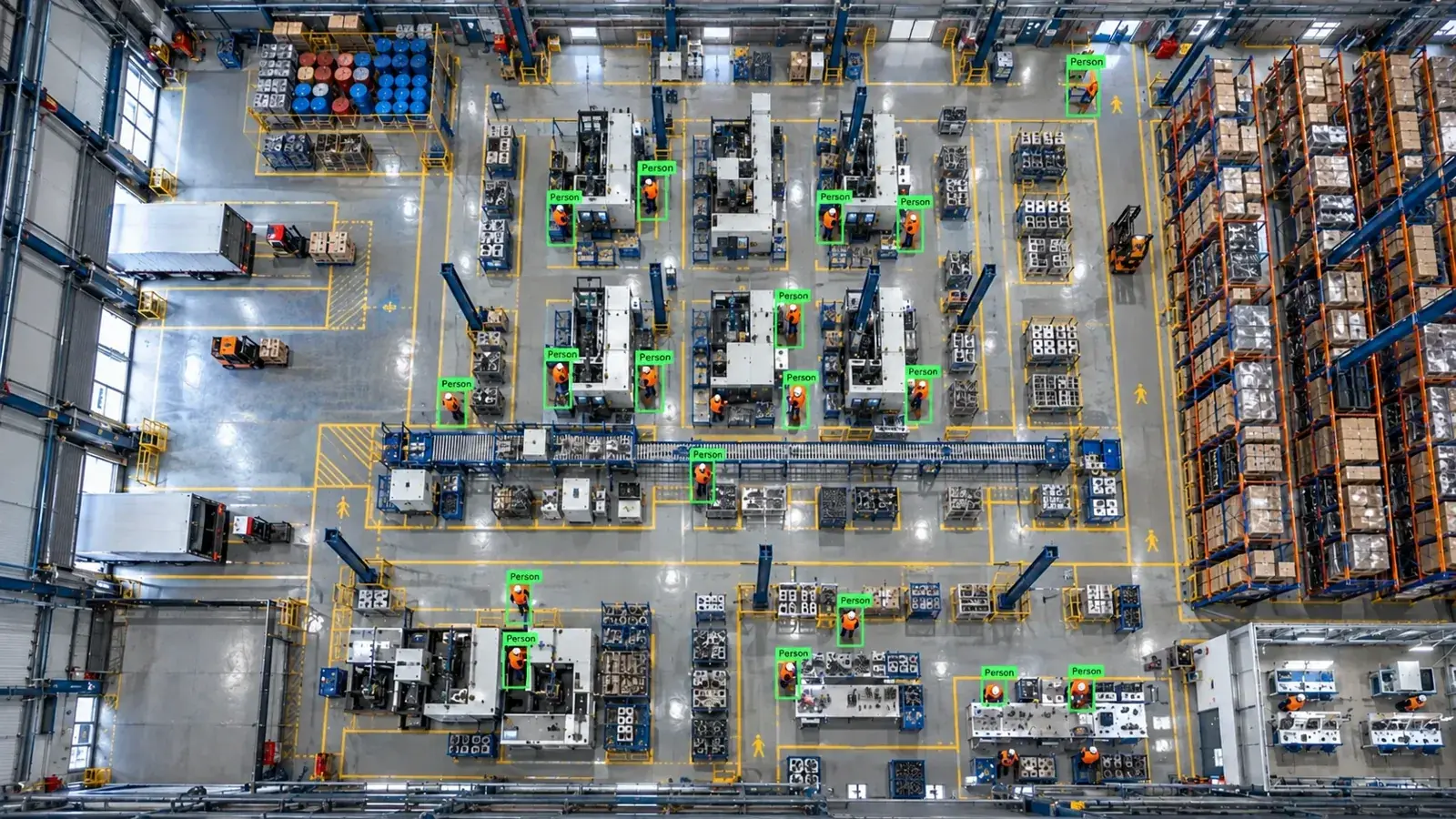
You can connect an AI module to your existing NVR system via RTSP or ONVIF without replacement. This enables stream analysis for alarms and third-party integrations.
Is It Possible to Add AI Without Replacing Your Existing NVR System?
Adding AI-powered analytics without fully replacing your NVR device is now a widely adopted solution. These systems typically connect directly to camera streams over the network using RTSP or ONVIF protocols for analysis.
In some cases, data can be taken from NVR channel streams or sub-streams, allowing the current system and recorder to operate normally while AI modules run externally as edge servers.
- Your NVR must support RTSP or ONVIF protocols.
- It is preferred to send camera channels to the AI server separately as multicast or unicast.
- Parallel analysis is possible without interrupting existing file or multimedia protocols.
Connection Methods: RTSP, ONVIF, and NVR Channel Streams
The AI module processes live video by accessing camera RTSP streams or pulling live images over ONVIF as a client. RTSP provides direct video streaming, while ONVIF supports camera features, motion detection, and recording controls.
In some scenarios, NVR devices make their own channel streams externally accessible. These sub-streams typically have lower bandwidth and resolution, so selecting streams with adequate quality for analysis is critical.
- RTSP connection is standard on most cameras and NVRs, suitable for live and recorded feeds.
- ONVIF offers integrated management and control benefits.
- Sub-streams are preferred for bandwidth savings, but resolution and frame rate must be considered.
Architectural Design of AI Integration
The typical architecture is: Camera feed → NVR/VMS → Edge AI server → Alarm/panel/ERP systems. In this structure, the AI system analyzes video streams without affecting the NVR’s recording function.
Camera footage is usually forwarded to the AI device via RTSP or ONVIF. On the edge server, appropriate analysis algorithms from the Hype-Model family (object detection, inspection, classification) are applied.
Analysis results can be sent to alarm panels, messaging platforms (WhatsApp, SMS), VMS pop-ups, PLC relays, or ERP/MES systems via REST API.
- The edge server operates in parallel with the NVR and cameras on the network.
- AI analysis can be performed in real time or on recorded footage.
- Alarms and reports automatically integrate with various systems.
Available Analysis Types and Use Cases
Common video processing analyses enabled by AI include:
Detection of Personal Protective Equipment (PPE) usage, restricted area violations, forklift or vehicle tracking, human and vehicle counting, and quality control for industrial applications.
Specialized cameras and lighting setups may be required to acquire high-quality data in specific environments.
- PPE compliance: Detection of masks, helmets, and other gear.
- Restricted areas: Monitoring entry and exit to designated zones.
- Forklift and vehicle detection with movement and speed tracking.
- Counting of people, products, or vehicles, and inventory monitoring.
- Quality control: Detecting markings, scratches, and deformations on products.
Technical and Operational Considerations
User permissions, network bandwidth, video compression standards (H.264/H.265), and firmware updates for cameras and NVR devices are critical factors in AI integration.
In bandwidth-constrained environments, using sub-streams and optimized video encoding is advisable. Security measures such as encryption and compliance with data protection regulations must be ensured.
- Video streams sent to the AI server should support encryption.
- Analysis of H.265 compressed streams requires compatible decoders or solutions.
- Firmware updates impact image quality and protocol compatibility.
- Detailed roles and access controls should be implemented for user authorization.
Compatibility Assessment and Installation Steps
A thorough compatibility check is essential before adding AI to your NVR system. Confirm your cameras support RTSP/ONVIF and that stream quality meets analysis requirements.
Assess bandwidth and network infrastructure; develop improvement plans if needed. Select an AI edge server and Hype-Model modules tailored to your needs.
Installation usually begins with a 2-4 week pilot phase, during which system testing, alarm configuration, and integrations are completed before full deployment.
- Verify camera and NVR protocol compatibility.
- Evaluate network bandwidth and infrastructure.
- Select AI server hardware and software modules.
- Conduct pilot implementation and testing.
- Complete integration and user training.
This page answers: nvr artificial intelligence · nvr ai integration · add ai to recording device
Frequently asked questions
Can I add AI analytics without replacing my current NVR device?
Yes. Most NVR systems supporting RTSP and ONVIF can integrate with externally operating AI modules. This allows adding analytics without affecting your existing recorder’s performance.
Does AI connect directly to cameras or work through the NVR?
Typically, camera footage is acquired via RTSP or ONVIF protocols by the AI server. NVR streams can also be used. While architectures vary, AI systems generally run as separate edge servers.
What types of analyses can AI perform?
Analyses include PPE compliance checks, restricted area violations, vehicle and human tracking, counting, and quality control. The chosen AI model, such as those in the Hype-Model family, is selected based on your specific needs.
Will bandwidth or video quality be an issue?
Video resolution and frame rate are important for analysis quality. While H.264 and H.265 streams are supported, using sub-streams is recommended when bandwidth is limited. Network capacity should be evaluated before installation.
How long does the installation process take?
Typically, a 2-4 week pilot phase is required. During this time, system integration, testing, and configuration are completed before the solution goes fully live.
What can AI detect in your factory?
Let's review together which safety, quality and production analytics your existing security cameras can deliver.
- Free 15-minute technical call
- Camera infrastructure pre-assessment
- Feasible AI scenarios