
Add AI Analytics to Pelco Cameras and VideoXpert VMSLearn how to integrate AI analytics with Pelco cameras and VideoXpert VMS via RTSP/ONVIF streams for enhanced on-premise detection and alerts.
Adding AI analytics to existing Pelco cameras and VideoXpert VMS can enhance facility safety and operational awareness without replacing your current hardware. Using streams accessible via RTSP or ONVIF, Hype Vision’s AI models work alongside Pelco systems to deliver real-time insights on-site.
This guide explains how to connect AI video analytics externally to Pelco setups, details feasible AI use cases, and highlights important technical considerations for a smooth deployment.
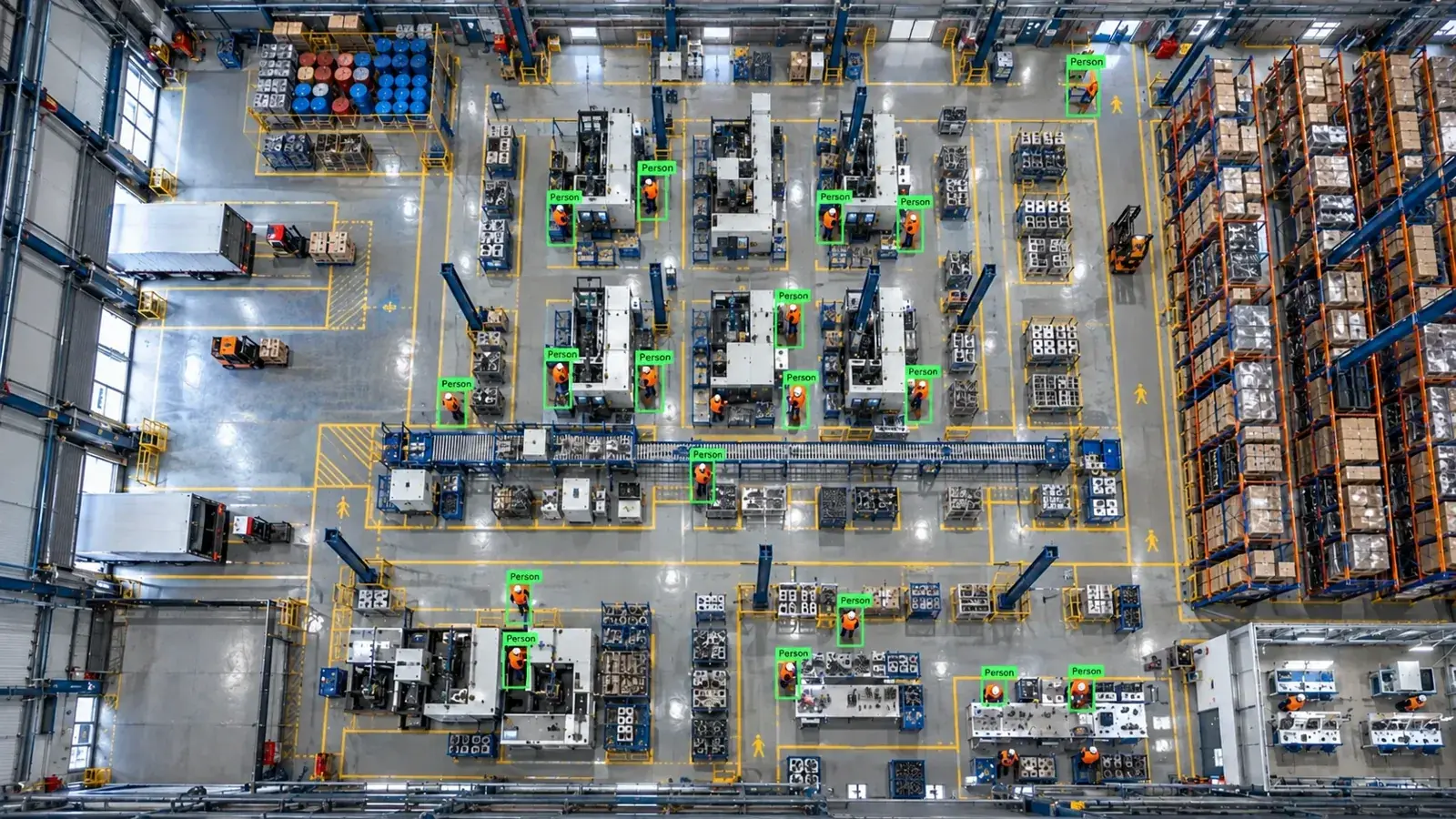
Hype Vision integrates AI analytics with Pelco cameras and VideoXpert VMS by accessing RTSP/ONVIF streams on-premise. This works alongside existing systems to add advanced detection and alerting without camera or VMS replacement.
Connecting AI Analytics to Pelco Cameras and VideoXpert VMS
Pelco cameras and the VideoXpert VMS typically provide video streams accessible over standard protocols like RTSP and ONVIF. Hype Vision’s AI analytics connect to these streams externally, allowing you to keep your existing Pelco hardware and software unchanged. This setup enables AI-powered detection, classification, and alerting using live video without interfering with your current surveillance operations.
| Connection Method | Description | Availability with Pelco |
|---|---|---|
| RTSP | Standard video stream pulled by AI server | Widely supported on Pelco IP cameras |
| ONVIF | Standard protocol for device discovery and stream management | Pelco cameras and VideoXpert VMS generally support ONVIF |
| Proprietary API | Vendor-specific management and possibly video access | API access to live video streams may be limited or unavailable in some configurations |
- RTSP streaming: Most Pelco cameras support RTSP streams for direct video access. These streams can be pulled by an on-premise AI server for real-time analysis.
- ONVIF integration: ONVIF compliant cameras and VMS can expose video streams and device metadata, facilitating simpler discovery and stream aggregation on the AI platform.
- API access: While VideoXpert provides robust APIs, some cloud or closed Pelco platforms may limit external video stream access. It’s important to verify if RTSP or ONVIF streaming is enabled and accessible in your system configuration.
- No camera or VMS replacement needed: Hype Vision integrates alongside your existing Pelco setup, preserving your investment and minimizing downtime.
How AI Analytics Architecture Works with Pelco Systems
The typical architecture involves video streams flowing from Pelco cameras or VideoXpert VMS to an on-premise edge server equipped with GPU capabilities. Hype Vision’s 'Hype-Model' AI algorithms analyze these streams in real time to detect objects, classify events, and track poses.
Processed insights and alerts are then fed into a centralized dashboard and can be pushed through multiple channels such as WhatsApp, SMS, VMS popups, PLC/relay controls, ERP/MES integrations, or REST APIs to fit operational workflows.
- Pelco Camera/VMS outputs RTSP or ONVIF video streams
- On-premises edge server with Hype-Model AI software ingests streams
- AI performs object detection, classification, pose estimation, and OCR on video frames
- Alerts and analytics appear on AI dashboard and integrate with existing Pelco systems
- Notifications distributed via SMS, WhatsApp, ERP/MES, or VMS alerts
Feasible AI Analytics Use Cases with Pelco Cameras
The Hype Vision platform supports a broad range of AI analytics use cases compatible with typical Pelco camera positioning and video quality:
1. Personal Protective Equipment (PPE) detection such as hard hats and high-visibility vests to improve occupational safety
2. Forklift and pedestrian interaction monitoring to reduce workplace collisions
3. Restricted area intrusion detection for enhanced site security
4. People counting and crowd density measurement for operational insights
5. Fire and smoke detection for rapid hazard alerts
6. Quality control and defect detection in manufacturing environments
This wide-ranging capability makes it suitable for industrial, logistics, and commercial settings where Pelco cameras are deployed.
Technical Considerations for Integration
Effective integration requires addressing several technical factors:
Bandwidth Management: Streaming multiple high-definition video feeds to the AI server can strain network bandwidth. Utilizing sub-streams with lower resolution and frame rate, typically H.264 or H.265 encoded, reduces load without significantly impacting AI performance.
User Permissions: Ensure that the RTSP or ONVIF streams are accessible with appropriate user credentials. Some Pelco systems restrict stream access via admin settings or firewall rules.
Firmware and Compatibility: Certain older cameras or firmware versions may lack full ONVIF support or have incomplete RTSP stream implementations. Testing stream availability before deployment is essential.
Stream Stability: Network reliability impacts continuous AI analysis; using wired connections or robust Wi-Fi configurations at the edge is recommended.
Privacy & Anonymity: Hype Vision emphasizes privacy-friendly modules, anonymizing personal data to comply with general data protection best practices.
Starting a Hype Vision AI Pilot with Pelco Cameras
The typical pilot phase lasts 2 to 4 weeks and includes these steps:
1. Assess your Pelco camera models, firmware versions, and streaming capabilities (RTSP/ONVIF).
2. Confirm network accessibility and user permissions for video streams.
3. Select relevant AI analytics use cases based on operational needs and camera placement.
4. Deploy the Hype Vision edge AI server on-premises, connected to Pelco camera streams.
5. Configure the AI models and notification endpoints (dashboard, SMS, VMS popups).
6. Monitor AI alert accuracy and system performance, adjusting as needed for optimal results.
7. Evaluate pilot outcomes to plan wider rollout or integration.
Important Notes: Relationship With Pelco and Compliance
Hype Vision is an independent provider of AI analytics that connects to Pelco cameras and VideoXpert VMS but is not an official partner or reseller. Our technology works alongside your existing Pelco infrastructure without replacing it.
Regarding safety compliance such as OSHA or ANSI guidelines, AI analytics serve as supplemental monitoring tools and do not replace regulatory obligations. Any compliance information provided is general in nature and not legal advice.
This page answers: pelco ai analytics · add ai to pelco · pelco videoxpert analytics · pelco onvif ai
Frequently asked questions
Can Hype Vision AI analytics work with all Pelco camera models?
Hype Vision supports any Pelco cameras that provide accessible RTSP or ONVIF video streams. Compatibility depends on your camera’s firmware and network configuration. Testing stream access is recommended before deployment.
Is it necessary to replace Pelco’s VideoXpert VMS to add AI analytics?
No, Hype Vision’s AI analytics run externally and independently, using video streams from Pelco cameras or VideoXpert VMS without requiring VMS replacement.
What kind of alerts can the AI system send with Pelco integration?
Alerts can be presented on the AI dashboard, as popups in the VMS, or sent out via WhatsApp, SMS, PLC/relay signals, ERP/MES systems, and REST APIs depending on operational needs.
Does adding AI analytics increase network bandwidth usage?
AI analytics require streaming video to the edge server, which adds network load. Using lower resolution sub-streams (H.264/H.265) and managing frame rates can minimize bandwidth impact.
Are any Pelco cloud or closed platforms incompatible with this AI integration?
Some Pelco cloud solutions may restrict access to video streams or APIs, limiting AI integration options. On-premise VideoXpert VMS and direct camera RTSP/ONVIF streams generally offer better accessibility.
Is Hype Vision an official Pelco partner?
No. Hype Vision is an independent AI analytics provider that connects alongside Pelco cameras and VMS but has no official partnership or presence within Pelco.
What can AI detect in your factory?
Let's review together which safety, quality and production analytics your existing security cameras can deliver.
- Free 15-minute technical call
- Camera infrastructure pre-assessment
- Feasible AI scenarios