
Add AI Video Analytics to Verkada Cameras with Hype VisionLearn how to add AI analytics to Verkada cloud cameras using RTSP or ONVIF streams for on-premise AI video analytics without replacing existing systems.
Verkada cameras offer cloud-based security, but adding external AI analytics can enhance onsite safety and operational insights without replacing your current setup.
Hype Vision integrates advanced AI capabilities via RTSP or ONVIF streams from Verkada cameras, running on-premise edge servers for real-time analytics and alerts.
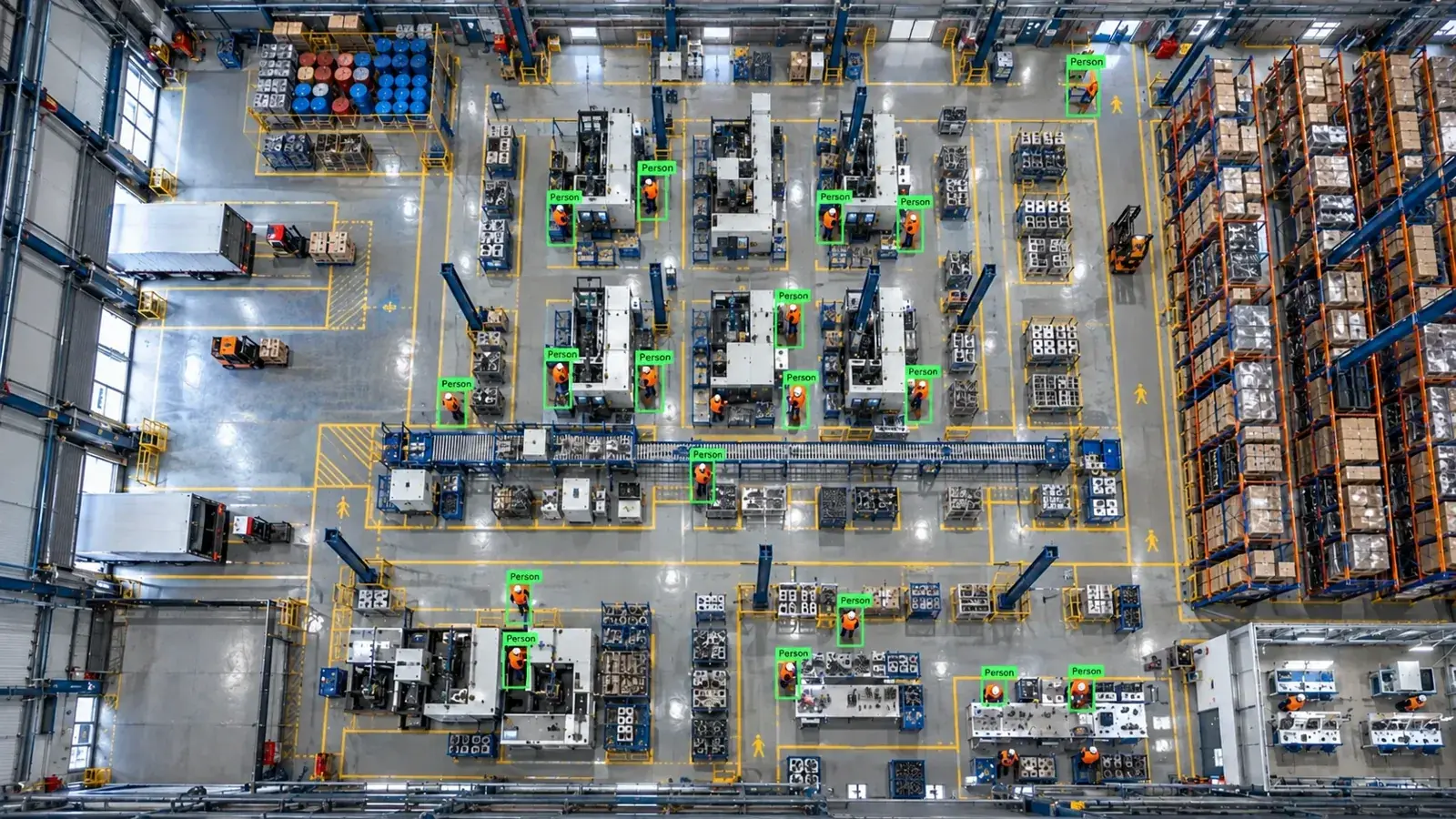
You can add AI video analytics to Verkada cameras by securely accessing their RTSP or ONVIF streams when available, then running Hype Vision’s AI on-premise for alerts and insights without replacing cameras or VMS.
Understanding Verkada Camera Integration Options
Verkada is primarily a cloud-managed camera system that emphasizes ease of use and cybersecurity. Unlike traditional IP cameras, Verkada cameras optimize cloud streaming and management, which results in some limitations accessing raw video streams for third-party AI systems.
Currently, Verkada cameras do expose RTSP or ONVIF streams, but access to these is often limited by firmware version, user permissions, and subscription plans. Some cloud features may restrict or delay real-time stream access through standard protocols used by external AI solutions.
Hype Vision connects to Verkada by leveraging available RTSP or ONVIF streams when enabled. This allows organizations to retain their existing Verkada subscriptions and VMS while augmenting their security infrastructure with AI analytics running on-premise edge devices.
| Protocol | Availability on Verkada | Notes |
|---|---|---|
| RTSP | Available on supported firmware/models | Must be activated; may be limited by cloud policies or subscription |
| ONVIF | Limited support depending on model | Less commonly used; verify camera compatibility |
| Verkada Cloud API | Mostly for system management | Video analytics integration not directly supported |
| Direct VMS connection | Not applicable | Verkada uses proprietary cloud VMS |
- RTSP and ONVIF are standard streaming protocols supported by many IP cameras.
- Verkada’s RTSP/ONVIF support requires enabling via camera settings and user permissions.
- Network setup must allow access from the AI server to the video stream ports.
- Bandwidth usage and video codec (H.264/H.265) compatibility should be evaluated.
Architecture: How Hype Vision Works Alongside Verkada Cameras
Hype Vision integrates with Verkada cameras by ingesting RTSP/ONVIF video streams in an on-premise AI server equipped with GPU acceleration.
The architecture enables AI analytics such as object detection, PPE compliance, pose estimation, and quality control without disrupting the existing Verkada cloud management.
This on-site server processes video streams in real-time and provides actionable alerts through various integration methods, ensuring facilities maintain control over privacy and latency.
- Camera streams video via RTSP/ONVIF to the local Hype Vision edge server.
- The server runs Hype-Model AI algorithms for object detection/classification and analytics.
- Alerts and insights are delivered via dashboards, VMS popups, SMS/WhatsApp notifications, PLC integrations, and REST API.
- Verkada cloud management continues independently, ensuring no disruption to existing workflows.
Feasible AI Analytics with Verkada Cameras
The video quality and camera placement of Verkada systems support a variety of AI analytics that enhance operational safety and efficiency.
Hype Vision leverages its Hype-Model suite to provide practical analytics tailored for industrial and commercial environments.
- PPE detection: Hard hats, hi-vis vests, safety goggles to improve compliance monitoring.
- Forklift and pedestrian interaction detection: Dangerous proximity alerts in warehouse settings.
- Restricted area monitoring: Detect unauthorized access to controlled zones.
- People counting: Track occupancy levels and manage facility flow.
- Fire and smoke detection: Early warnings to mitigate safety risks.
- Quality control: Inspect product defects or assembly line compliance via pose and object classification.
Considerations for Integrating Hype Vision AI with Verkada Cameras
Successful integration requires careful attention to technical details and operational constraints to ensure optimal AI performance and system reliability.
- Bandwidth and sub-streams: To reduce network load, use a lower-resolution sub-stream (commonly set via camera settings) with H.264 or H.265 codecs.
- User permissions: RTSP/ONVIF access may require admin roles or specific credentials within Verkada’s system.
- Firmware versions: Ensure your cameras run firmware that supports RTSP/ONVIF streaming and enable these features per camera.
- Privacy: Hype Vision supports anonymous, privacy-friendly analytics that do not store personal data.
- Network security: Use VLANs or firewall rules to secure video streams between cameras and AI servers.
- Parallel operation: Hype Vision operates alongside Verkada’s cloud without replacing or interfering with existing VMS or cloud functions.
Step-by-Step Pilot for Verkada AI Analytics with Hype Vision
A typical pilot to validate AI capabilities and integration feasibility usually spans 2-4 weeks, offering a fast proof of concept without heavy upfront investment.
- 1. Assess Verkada camera models, firmware versions, and enable RTSP/ONVIF streams with proper permissions.
- 2. Identify camera placements and video streams suitable for desired analytics (e.g., entrances for PPE detection).
- 3. Configure network settings to allow Hype Vision edge server access to those streams.
- 4. Deploy Hype Vision on-premise software with GPU support to ingest the streams and activate relevant Hype-Model analytics.
- 5. Monitor system performance, alerts, and dashboards to confirm detection accuracy and latency.
- 6. Adjust configurations, camera angles, or AI models as needed during pilot.
- 7. Evaluate integration benefits and plan for production deployment if successful.
This page answers: add ai to verkada · verkada video analytics · verkada ai integration · verkada ppe detection · third party ai for verkada
Frequently asked questions
Can I use Verkada cameras’ RTSP streams for AI analytics?
Yes, many Verkada cameras can expose RTSP streams if enabled and allowed by your subscription and firmware. You need proper permissions, and network access is required for your AI server to connect.
Does Hype Vision require replacing Verkada cameras or VMS?
No, Hype Vision integrates alongside existing Verkada cameras and cloud VMS by accessing standard video streams. There's no need to replace hardware or the existing management system.
What kind of AI analytics can be added to Verkada cameras?
Common AI use cases include PPE detection, people counting, restricted zone monitoring, forklift-pedestrian safety, fire and smoke detection, and quality control inspection.
Is using AI analytics on Verkada cameras compliant with privacy requirements?
Hype Vision uses privacy-friendly AI modules that avoid storing personally identifiable information. However, always consult legal experts to ensure compliance with local privacy laws and workplace regulations.
What network bandwidth considerations exist when adding AI to Verkada cameras?
To minimize bandwidth, it's common to use sub-streams at lower resolution and compressed codecs like H.264 or H.265. Ensure your network can reliably handle the additional stream connections to the AI server.
Does Hype Vision have an official partnership with Verkada?
No, Hype Vision is not an official partner of Verkada. Our solution works by connecting to available standard streams alongside existing Verkada infrastructure.
What can AI detect in your factory?
Let's review together which safety, quality and production analytics your existing security cameras can deliver.
- Free 15-minute technical call
- Camera infrastructure pre-assessment
- Feasible AI scenarios