
AI-Based Image Processing Integration with Milestone XProtectIntegrate AI-powered image processing with Milestone XProtect VMS using existing cameras and RTSP/ONVIF protocols without hardware replacement.
Integrating AI-driven image processing with comprehensive VMS solutions like Milestone XProtect opens new possibilities in security and industrial automation. The Hype Vision platform is a brand-neutral industrial image processing solution that seamlessly integrates with existing IP/CCTV cameras.
This article details the technical aspects, connection methods, architectural setup, and key considerations for integrating Hype Vision AI with Milestone XProtect.
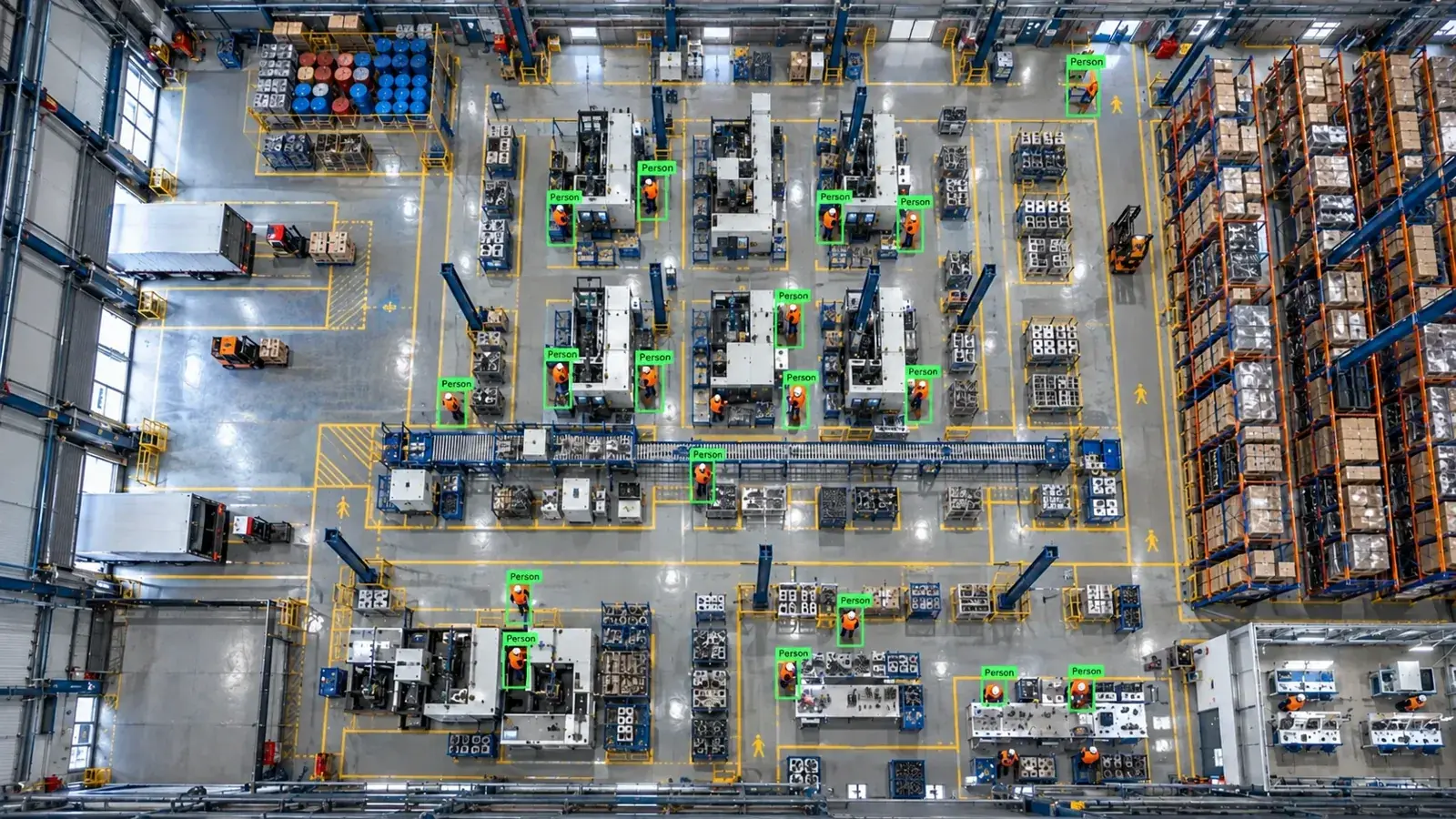
AI image processing integration with Milestone XProtect is possible without replacing existing cameras using RTSP/ONVIF protocols. Analysis runs on an edge server, sending alarms and popups back to the VMS.
Is Integration Possible Without Replacing Existing Devices?
The Hype Vision platform is designed to operate with existing IP or CCTV cameras that support RTSP and ONVIF, regardless of brand. This enables AI-powered analytics without needing to replace current cameras.
Milestone XProtect VMS also supports RTSP and ONVIF protocols, allowing connection with minimal changes to the existing device infrastructure. However, camera specifications like resolution, frame rate, and codec can impact AI analysis performance.
Additionally, for specialized analyses such as quality control, using industrial cameras and appropriate lighting can be beneficial.
- Existing IP/CCTV cameras supporting RTSP/ONVIF can be used
- No mandatory camera replacements required
- Image quality and codec standard (H.264/H.265) affect analysis accuracy
- Industrial cameras and lighting can be added if needed
Connection Methods: RTSP, ONVIF, NVR Stream and Substream Selection
RTSP streaming is the most common connection method between Milestone XProtect and Hype Vision. Both main and alternative streams (substream/low stream) can be selected via RTSP URLs. Substreams reduce bandwidth and processing load but must maintain sufficient quality for analysis.
The ONVIF protocol facilitates device discovery and simplifies connection setups. Live streams and control commands can be managed via ONVIF.
While NVR channel streaming is possible, it may sometimes introduce latency. Therefore, direct RTSP streaming from cameras is preferred for faster and more reliable AI analysis.
Cameras must support H.264 or H.265 codecs, and bandwidth as well as processing capacity should be considered.
- Redirect live streams via RTSP for AI analysis
- Use ONVIF for device discovery and control
- Configure substreams with sufficient quality and frame rate for analysis
- Be aware of latency and resource sharing when using NVR channel streams
- Optimize camera codec settings and image quality appropriately
Architecture: Cameras, NVR/VMS, Edge Server, and Alarm Panels
In the typical integration architecture, cameras connect to the VMS or directly to the edge server via RTSP or ONVIF. The edge server runs Hype Vision’s Hype-Model AI algorithms to analyze images.
Events generated from analyses—such as PPE violations, restricted area breaches, forklift detections, object counting, and quality control—are transmitted to Milestone XProtect via REST API or other supported protocols.
Milestone XProtect displays these events as popups in the user interface and can forward alarms to SMS, WhatsApp, PLC relays, or ERP/MES systems.
This architecture supports on-premise operation, ensuring user privacy and compliance with data protection regulations.
- Camera → RTSP/ONVIF → Edge Server (Hype Vision analysis platform)
- Edge Server → REST API/Alarm protocols → Milestone XProtect VMS
- Popup, panel, and notification display within the VMS
- PLC/relay and ERP/MES integration as required
- On-premise infrastructure ensuring compliance with data privacy laws
Available Analyses and Application Areas
Hype Vision’s Hype-Model family includes various AI models enabling these analyses:
- PPE (Personal Protective Equipment) compliance: Detecting helmets, vests, and other required gear,
- Restricted area violation: Recognizing unauthorized entries into defined zones,
- Forklift and vehicle detection: Tracking movement and counting forklifts,
- Object counting and classification: Monitoring inventory or products in warehouses or production lines,
- Quality control: Conducting visual inspections and barcode reading via OCR on production lines.
The success of these applications depends on camera quality, viewing angle, and lighting. Using industrial cameras and enhanced lighting may improve results as needed.
- Detect PPE non-compliance
- Recognize restricted area intrusions
- Count forklifts, personnel, and vehicles
- Visual quality control and OCR-based barcode reading
- Adjust camera and lighting based on field conditions
Technical and Operational Considerations
User permissions and access control must comply with data protection regulations and internal security policies.
Optimize RTSP stream resolution and frame rate to manage bandwidth efficiently, preferably using H.264 or H.265 codecs.
Keep camera and VMS firmware updated and regularly test RTSP/ONVIF protocol compatibility.
Ensure edge server hardware matches the analysis workload and supports scalability when required.
Conduct pilot testing under real conditions to evaluate bandwidth, latency, analysis accuracy, and alarm reliability.
- Proper configuration of user rights and permissions
- Bandwidth and codec optimization (H.264/H.265)
- Continuous monitoring of firmware and protocol compliance
- Sufficient edge server hardware capacity
- Field testing via pilot deployment
Suitability Evaluation and Installation Steps
1. Assess existing camera and network infrastructure: verify RTSP/ONVIF support and image quality,
2. Evaluate infrastructure suitability by checking bandwidth and resource availability,
3. Install and configure the Hype Vision edge server and connections,
4. Set up alarm integration with Milestone XProtect including API and popup configurations,
5. Test different AI modules during the pilot phase and monitor performance,
6. Implement camera or lighting improvements if necessary,
7. Provide ongoing training and manage user permissions during system deployment.
- Verify camera and network infrastructure suitability
- Set up edge server and AI modules
- Integrate alarms and popups with Milestone XProtect
- Conduct pilot testing and optimize analytics
- Apply required hardware and environmental improvements
- Deploy system with user management and training
This page answers: milestone xprotect image processing · milestone ai integration · vms ai integration
Frequently asked questions
Can I integrate AI with Milestone XProtect without changing my existing cameras?
Yes, existing IP or CCTV cameras supporting RTSP and ONVIF can be used. The Hype Vision platform operates independently of camera brands, so replacements aren’t necessary, although image quality may affect analysis performance.
Which connection method should I use for AI analytics?
RTSP streaming is commonly used for AI analysis, while ONVIF is suitable for device discovery and control. Using substreams reduces bandwidth but must maintain adequate quality for reliable analysis.
How are analysis results displayed in Milestone XProtect?
Events from AI analysis are sent to Milestone XProtect via REST API or alarm protocols. The VMS displays popups on the user interface and can forward alarms to SMS, WhatsApp, PLC, or ERP/MES systems.
Why is bandwidth and codec selection important?
Higher resolution and frame rates improve analysis accuracy but increase bandwidth and processing load. Using H.264 or H.265 codecs reduces bandwidth consumption and stabilizes streaming.
What should I focus on during the pilot implementation?
Perform comprehensive testing of bandwidth, latency, analysis accuracy, and VMS integration in real-world conditions. Adjust camera angles, lighting, and hardware as needed to optimize performance.
What can AI detect in your factory?
Let's review together which safety, quality and production analytics your existing security cameras can deliver.
- Free 15-minute technical call
- Camera infrastructure pre-assessment
- Feasible AI scenarios